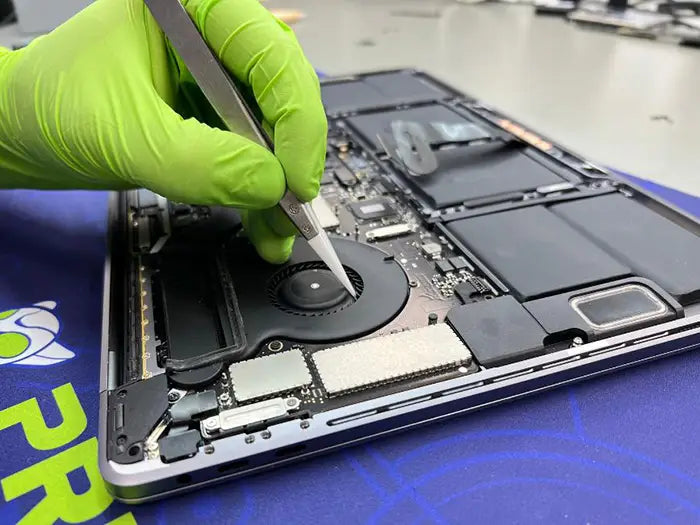
MacBook USB-C and Charging Port Repair: Causes, Diagnosis, and Cost
In most cases, a MacBook USB-C port problem can be repaired. The correct repair depends on what is actually failing. Sometimes the solution is as simple as safely removing lint or debris from the port. In other cases, the problem may involve a worn connector, bent contact, liquid damage, a failed USB-C controller, or a board-level charging fault that requires component-level repair.
For most MacBook USB-C repair cases, diagnosis should come before replacement. A MacBook that is not charging does not automatically need a new battery, and a loose USB-C cable does not always mean the entire logic board has failed. A technician needs to separate the charger, cable, physical port, battery, and board-level charging circuit before recommending the correct repair.
If your MacBook only charges when the cable is held at an angle, has one USB-C port that works while another does not, or has stopped recognizing external drives, monitors, or docking stations, the issue may be inside the port or the circuitry behind it. Stop forcing the connection and have the port inspected before the damage becomes worse.
Table of Contents
What Your MacBook USB-C Port Actually Does
Many MacBook owners think of the USB-C port simply as “the charging port.” While charging is one of its primary functions, it is only part of what the connection does. On modern MacBook models, a single USB-C or Thunderbolt port can handle several functions at the same time.
This is why one damaged port can create symptoms that appear unrelated. Depending on which contacts or circuits are affected, a USB-C port problem may interfere with charging, data transfer, external displays, docking stations, or connected accessories.
Charging and USB-C Power Delivery
On USB-C MacBook models, the port carries power from the charger into the computer. In some situations, it can also provide power to connected accessories.
Charging is more complex than a basic electrical connection. USB-C charging relies on power delivery negotiation between the MacBook, charger, and cable. If that communication is weak or inconsistent, the MacBook may charge only when the cable is held at a certain angle, repeatedly start and stop charging, or fail to recognize the charger altogether.
A worn cable, low-quality power adapter, damaged USB-C port, or board-level charging fault can all produce similar symptoms. For that reason, testing the charger and cable should always be part of a proper MacBook charging diagnosis.
Data Transfer and External Drives
The same USB-C port may also handle high-speed data transfer for external SSDs, backup drives, memory card readers, phones, and other accessories.
If the data contacts or related circuitry are damaged, the MacBook may continue charging normally but fail to recognize an external drive. In other cases, the drive may connect briefly and then disconnect. This can make the external device appear faulty when the real problem is the MacBook’s USB-C port or controller.
External Displays, Docks, and Thunderbolt Accessories
Depending on the MacBook model, USB-C or Thunderbolt ports may also send video to an external monitor and connect the computer to docking stations and other Thunderbolt accessories.
Apple’s guide to Mac ports explains that supported ports may connect USB devices, Thunderbolt devices, external displays, and power adapters, depending on the Mac model and port type.
This matters because a MacBook USB-C port can fail partially. One function may stop working while another continues operating. For example, the MacBook may charge through the port but fail to detect an external monitor, or it may recognize a storage device while charging unreliably.
Why One Port Failure Can Look Like Several Problems
Because charging, data, display, and accessory communication can all pass through the same physical connector, one damaged USB-C port can create several different symptoms.
| Symptom | Possible Meaning |
|---|---|
| MacBook charges only at an angle | Loose port, worn connector, damaged cable, or weak contact |
| One USB-C port works but another does not | Localized port, connector, solder joint, or circuit issue |
| External monitor is not detected | Display line, Thunderbolt, cable, dock, or USB-C port issue |
| External drive disconnects randomly | Data-line issue, accessory problem, or unstable port connection |
| MacBook does not charge through any port | Charger, cable, battery, USB-C controller, charging circuit, or logic board issue |
If several symptoms overlap, do not assume the worst immediately. A professional diagnostic can determine whether the problem is caused by the physical USB-C port, charger, cable, battery, controller, or logic board.
If you are experiencing charging, USB-C, liquid damage, battery, or logic board symptoms, explore our Mac repair services in Miami. Proper diagnosis can help identify the cause before you replace the wrong part.
Signs Your MacBook USB-C or Charging Port Needs Repair
Some USB-C port symptoms are obvious, while others are easy to mistake for a battery or charger problem. The table below provides a quick starting point before a full diagnosis.
| Symptom | Likely Direction | First Thing to Check |
|---|---|---|
| Charger only works at an angle | Loose or worn USB-C port | Test another cable and charger |
| Cable feels loose or falls out | Physical port wear or debris | Inspect for lint or visible damage |
| One USB-C port works while another does not | Localized port or connector issue | Test the same cable on every port |
| External drive is not recognized | Data-line, accessory, or port issue | Test the drive on another Mac or another port |
| External monitor is not detected | Display, dock, cable, or USB-C issue | Try another cable or display |
| MacBook will not charge through any port | Charger, battery, controller, or logic board issue | Test a known-good charger and cable |
| Heat, burning smell, corrosion, or liquid near the port | Possible short circuit or liquid damage | Stop using the port immediately |
MacBook Not Charging Through USB-C
If your MacBook does not respond when you connect the charger, do not assume the USB-C port has failed immediately. First, test with a known-good Apple charger or a high-quality USB-C power adapter and cable.
Many charging complaints are caused by worn charging cables, underpowered adapters, damaged chargers, or dirty connectors. If the MacBook still will not charge after testing a reliable charger and cable, the next step is a professional port and board-level diagnosis.
Charger Only Works at an Angle
A MacBook that charges only when the cable is held at a certain angle usually has a physical connection problem. The USB-C connector may be worn, loose, dirty, or physically damaged.
This is one of the clearest signs that the port should be inspected. Continuing to twist or force the cable into position can make the connector worse and may damage nearby solder joints or surrounding logic board components.
Cable Feels Loose or Falls Out
A USB-C cable should fit securely. If it wiggles excessively, falls out easily, or no longer feels firmly seated, the cause may be lint inside the port, a worn cable connector, or internal wear within the MacBook's USB-C port.
Do not insert metal tools into the port to remove debris. If lint is packed inside, it should be cleaned carefully to avoid bending or damaging the delicate internal contacts.
One USB-C Port Works but Another Does Not
If your MacBook has multiple USB-C ports and only one is malfunctioning, the problem is often localized. The issue may involve the connector itself, damaged contacts, corrosion, failed solder joints, or the circuitry associated with that specific port.
A battery problem typically affects charging across the system rather than causing only one USB-C port to stop working.
External Monitor, Dock, or Drive Is Not Recognized
Charging and data or display functions can fail independently. A USB-C port may continue charging the MacBook while no longer recognizing external SSDs, docking stations, or displays.
For this reason, a proper repair should include testing every function of the port—not simply verifying that the battery charges. After repair, charging, data transfer, display output, and accessory detection should all be confirmed.
MacBook Charging Port Problem or Battery Problem?
A MacBook that will not charge does not automatically need a battery replacement. Likewise, a MacBook with a loose USB-C cable does not automatically have a healthy battery. These symptoms can overlap, so it is important to identify the actual cause before replacing any parts.
This guide focuses on the USB-C port and charging path rather than complete battery diagnostics. However, understanding the differences between battery-related and port-related symptoms can help you make a more informed repair decision.
| Symptom Pattern | Port More Likely | Battery More Likely | Charger/Cable More Likely | Logic Board More Likely |
|---|---|---|---|---|
| Charges only at an angle | Yes | No | Possible | Less likely |
| One USB-C port works while another does not | Yes | No | Less likely | Possible |
| Cable feels loose or falls out | Yes | No | Possible | Less likely |
| External drives or displays fail on one port | Possible | No | Possible | Possible |
| Battery drains quickly | No | Yes | No | Possible |
| MacBook shuts down while running on battery | No | Yes | No | Possible |
| Battery swelling or raised trackpad | No | Yes | No | No |
| No charging on any port using multiple known-good chargers | Possible | Possible | Possible | Yes |
When the Battery Is More Likely
Battery issues typically appear as reduced battery life, unexpected shutdowns, battery swelling, service warnings, or a MacBook that only operates while connected to power.
If your symptoms match these patterns, the battery may be the primary issue rather than the charging port. Learn more about our MacBook Pro battery replacement service if your Mac's battery health has significantly deteriorated.
Apple's Mac charging guidance also explains that charging behavior depends on your Mac model, charger, cable, and supported port type, which is one reason charging symptoms can vary.
When the USB-C Port Is More Likely
The USB-C port becomes the more likely cause when the problem depends on the physical connection.
Common port-related symptoms include:
- The charger only works when held at a certain angle.
- The USB-C cable feels loose inside the port.
- One USB-C port works while another does not.
- The MacBook charges but fails to recognize external devices.
- The MacBook behaves differently depending on which USB-C port is used.
These symptoms typically point toward the connector itself, worn contacts, damaged data lines, display lines, or the local circuitry connected to that specific port.
When the Logic Board or Charging Circuit Is More Likely
If your MacBook will not charge through any USB-C port—even after testing multiple known-good chargers and cables—the problem may extend beyond the physical connector.
The USB-C controller, charging circuit, power rails, or other logic board components may require professional testing.
Professional Tip: Board-level charging failures are where guessing becomes expensive. Replacing a battery, charger, or even the USB-C connector without proper diagnostics may not solve the problem. A professional diagnosis identifies the failed component before unnecessary parts are replaced.
Common Causes of MacBook USB-C Port Failure
MacBook USB-C port problems are usually caused by physical wear, debris buildup, liquid exposure, cable stress, or board-level component failure. Identifying the root cause is important because not every charging problem requires replacing the USB-C port.
Dust, Debris, and Pocket Lint Inside the Port
Dust, lint, and debris are among the most common—and most repairable—causes of intermittent charging problems. Even a small amount of compacted lint can prevent the USB-C connector from seating fully, making the cable feel loose or causing charging to disconnect unexpectedly.
If debris is the only problem, a careful professional cleaning may restore normal operation without replacing any components.
Bent Pins or Worn Connector Contacts
USB-C connectors are compact and precisely engineered. Years of plugging and unplugging cables, especially if the connector is repeatedly inserted at an angle, can wear down the internal contacts.
When the connector itself is physically damaged, cleaning alone will not solve the problem. Depending on the MacBook model, the repair may involve replacing the USB-C port or performing component-level board repair.
Cable Stress and Charging at an Angle
Holding the charging cable at a specific angle may seem like a temporary workaround, but it usually makes the problem worse over time. Constant pressure places additional stress on the connector, port housing, and solder joints attached to the logic board.
If you must bend or hold the cable to keep your MacBook charging, stop using that workaround and have the port inspected before further damage occurs.
Liquid Damage or Corrosion
Liquid exposure can damage the USB-C connector directly or corrode the circuitry surrounding the port. Even a small spill, high humidity, or condensation inside the computer can lead to delayed failures days or weeks later.
Corrosion often begins around the connector and gradually spreads to nearby components. If your USB-C issues started after liquid exposure, schedule a liquid damage inspection before continuing to use the computer.
Failed USB-C Controller or Charging Circuit
Sometimes the physical USB-C port appears completely normal, yet the MacBook still refuses to charge correctly. In these cases, the problem may lie with the USB-C controller, charging circuit, or power delivery path located on the logic board.
These failures require electrical testing and board-level diagnostics. Replacing the visible connector alone will not repair a failed charging controller or damaged power delivery circuit.
Logic Board Power Rail Faults
More serious charging failures can involve damaged power rails or other components on the logic board. These issues commonly develop after liquid damage, electrical shorts, impact damage, or normal component failure.
If the USB-C issue is part of a broader board-level failure, board-level MacBook repair may be required instead of a simple USB-C port replacement.
How Technicians Diagnose a MacBook USB-C Port Problem
A professional MacBook USB-C repair should always begin with diagnosis—not guesswork. The goal is to determine whether the problem is caused by the charger, USB-C cable, physical connector, battery, USB-C controller, charging circuit, or the logic board itself.
At Prime Tech Support, MacBook USB-C diagnosis is part of a comprehensive repair process. Since 2010, our Miami team has completed more than 5,000 Mac repairs and specializes in advanced diagnostics, component-level logic board repair, and micro-soldering.
Step 1: Test the Charger, Cable, and Power Source
The first step is eliminating the most common causes. A technician should test the MacBook using a known-good charger, a properly rated USB-C cable, and a reliable power source.
USB-IF cable and connector guidance explains that USB-C cables have different capabilities, including maximum power ratings and certification standards. A damaged, low-quality, or underpowered cable can easily mimic the symptoms of a faulty charging port.
Step 2: Inspect the Port Under Magnification
A detailed visual inspection under magnification can reveal compacted lint, bent contacts, corrosion, discoloration, cracked solder joints, or physical damage that is impossible to identify with the naked eye.
This inspection helps determine whether the issue can be resolved with professional cleaning or whether the connector has sustained physical damage requiring repair.
Step 3: Test Each USB-C Port Separately
If the MacBook has multiple USB-C or Thunderbolt ports, each one should be tested individually.
A technician should verify:
- Charging performance
- How securely the cable fits
- External drive recognition
- Dock functionality
- Display output
- Accessory communication
- Whether the symptoms follow the cable or remain isolated to one specific port
If only one port fails while the others function normally, the issue is usually localized. If every port exhibits the same problem, the cause is more likely related to the charger, battery, USB-C controller, charging circuit, or logic board.
Step 4: Check Battery and Charging Circuit Behavior
If the USB-C connector appears physically healthy, technicians move on to electrical testing. This includes verifying whether the battery is accepting charge, whether power is reaching the logic board correctly, and whether the USB-C controller is successfully negotiating USB Power Delivery.
This is where professional diagnostics become especially valuable. From the outside, a failed battery, damaged charging circuit, defective USB-C controller, and faulty charging cable can all produce nearly identical symptoms.
Not sure what's causing your charging problem? Book a MacBook diagnostic before replacing expensive parts.
Step 5: Confirm Charging, Data, Display, and Accessory Function After Repair
Once repairs are complete, the USB-C port should be tested for much more than charging alone.
A complete post-repair inspection should confirm:
- Stable charging performance
- Proper cable fit
- Reliable external drive detection
- Correct display output
- Dock and accessory compatibility
- Consistent operation across every USB-C port
- No excessive heat or instability during use
A MacBook that charges successfully but cannot transfer data or connect to external displays is not fully repaired. Every USB-C function should be verified before the computer is returned to the customer.
MacBook USB-C Repair Options
Not every USB-C problem requires the same repair. The correct solution depends on the MacBook model, the design of the USB-C port, the type of damage, and whether the issue is limited to the connector or involves the logic board.
| Repair Option | Best For | Complexity |
|---|---|---|
| Safe port cleaning | Debris, lint, or minor connection obstruction | Low |
| USB-C port replacement | Worn, loose, or physically damaged connector | Moderate |
| Connector repair / micro-soldering | Damaged solder joints or board-mounted connector faults | High |
| USB-C controller or charging circuit repair | Port appears physically normal but charging still fails | High |
| Logic board repair | Corrosion, power rail faults, or broader board damage | High |
Safe Port Cleaning
If lint or other debris is preventing the USB-C connector from making proper contact, a careful professional cleaning may restore normal charging without replacing any parts.
This is the least invasive repair and should always be considered before recommending a larger repair. Attempting to clean the port with metal tools or excessive force can easily damage the delicate internal contacts.
USB-C Port Replacement
If the connector is worn, loose, bent, or physically damaged, replacing the USB-C port may be necessary. The exact procedure depends on your MacBook model and how the connector is attached internally.
Some MacBook models use modular USB-C port assemblies that can be replaced independently, while others require advanced board-level repairs because the connector is soldered directly to the logic board.
Connector Repair and Micro-Soldering
If the USB-C connector itself or its solder joints have been damaged, micro-soldering may be required. This highly specialized repair is performed under a microscope using precision equipment designed for board-level electronics.
Micro-soldering is not a DIY repair. An incorrect repair attempt can damage nearby components and turn an otherwise repairable charging port into a much more expensive logic board repair.
USB-C Controller or Charging Circuit Repair
If the USB-C connector appears physically healthy but charging still fails, the problem may be located within the USB-C controller or charging circuit.
These repairs require board-level diagnostics and component-level replacement rather than simply installing a new connector.
When only the failed electronic component is repaired, it is often possible to restore proper charging without replacing the entire logic board.
Logic Board Repair When the Port Is Not the Only Problem
Sometimes the USB-C connector is only one symptom of a larger hardware failure. Liquid damage, corrosion, short circuits, or failed power management components may affect multiple areas of the logic board.
In these situations, replacing the visible connector alone will not solve the problem. The underlying cause must be diagnosed and repaired before the MacBook can reliably charge again.
Why diagnosis matters: Two MacBooks with identical charging symptoms can require completely different repairs. One may only need a professional cleaning, while another may require advanced micro-soldering or logic board repair. Proper diagnostics prevent unnecessary part replacement and reduce repair costs.
MacBook USB-C Repair Cost: What Affects the Price?
There is no honest one-price answer for MacBook USB-C repair without first diagnosing the problem. The cost depends on what has actually failed and how complex the repair is.
A dirty USB-C port and a failed board-level charging circuit are completely different repairs. A reliable estimate should come after inspection—not before the technician knows whether the issue is debris, connector wear, liquid damage, battery failure, a failed USB-C controller, or logic board damage.
MacBook USB-C Repair Cost at a Glance
| Repair Type | Typical Situation | Cost Level |
|---|---|---|
| Safe port cleaning | Lint or debris prevents the cable from seating properly | Lowest |
| USB-C port replacement | Port is loose, worn, bent, or physically damaged | Moderate |
| Connector repair / micro-soldering | Connector or solder joints have been damaged | Higher |
| USB-C controller or charging circuit repair | Port appears normal but power negotiation fails | Higher |
| Liquid damage or logic board repair | Corrosion, short circuits, or broader board damage | Highest (Quote after diagnosis) |
Cost Factor 1: MacBook Model and Port Design
Different MacBook generations use different internal designs. Some USB-C ports are easier to access and replace than others, while certain models require advanced board-level work.
The MacBook model directly affects labor time, parts availability, and the overall repair approach.
Cost Factor 2: Physical Port vs. Board-Level Failure
A worn or physically damaged connector is usually more straightforward to repair than a failed charging circuit or USB-C controller.
If the problem involves the charging controller, power delivery circuitry, or logic board power rails, the repair becomes more complex because it requires advanced diagnostics and component-level repair.
Cost Factor 3: Liquid Damage or Corrosion
Liquid damage often extends beyond the USB-C connector itself. If corrosion is present, the repair may require professional cleaning, microscope inspection, and board-level work before the charging port can be considered reliable again.
Cost Factor 4: Parts Availability
Replacement part availability can affect both repair pricing and turnaround time, particularly for newer MacBook models or less common configurations.
Cost Factor 5: Testing Time
A quality repair does not end when the replacement is complete. Proper post-repair testing should verify charging stability, data transfer, display output, USB-C accessory recognition, and reliable operation across every port.
Our recommendation: Start with a professional diagnostic rather than replacing parts based on symptoms alone. Once the exact cause is identified, you'll receive an accurate repair recommendation and estimate instead of paying for components you may not actually need.
Apple Store vs Component-Level MacBook USB-C Repair
If your MacBook is still covered by Apple's Limited Warranty or AppleCare+, Apple may be the best place to start. Depending on the issue and your coverage, warranty service may reduce or eliminate your out-of-pocket repair costs.
If your MacBook is no longer under warranty, the decision becomes more important. Apple may recommend replacing a larger assembly or even the entire logic board, depending on the model and the type of damage. In some situations, that is the appropriate repair—but it is not always the only option.
Component-level repair is often worth considering when the failure is localized. A worn USB-C connector, damaged solder joint, failed USB-C controller, or limited corrosion may be repairable without replacing the entire logic board.
The most important step comes before choosing where to repair your MacBook: obtain an accurate diagnosis. Once you know exactly which component has failed, you can compare repair options with confidence instead of paying to replace parts that may still be working properly.
What Should Be Diagnosed First?
Before approving a major repair, you should know whether the problem involves:
- The charger
- The USB-C cable
- The physical USB-C port
- The battery
- The USB-C controller
- The charging circuit
- The logic board
Knowing the actual cause allows you to compare repair options more intelligently and avoid replacing assemblies that may not be necessary.
Can You Fix a MacBook USB-C Port Yourself?
There are a few safe checks you can perform before scheduling a repair, but USB-C port replacement and micro-soldering are not DIY repairs. Modern MacBook charging systems rely on delicate connectors and complex board-level circuitry that require specialized tools and experience.
Safe Checks You Can Try First
Before assuming the USB-C port has failed, you can safely try the following:
- Test a different charger.
- Test a different USB-C cable.
- Try another wall outlet or power source.
- Check whether your other USB-C ports work correctly.
- Use a flashlight to look inside the port for visible lint or debris.
If the problem disappears after changing the charger or cable, the MacBook's USB-C port may not be the source of the issue.
What Not to Put Inside the Port
Do not insert metal tools, needles, paper clips, sharp objects, or liquid cleaners into the USB-C port. Avoid scraping or forcing anything against the internal contacts.
USB-C connectors are extremely small and precise. Bending a single contact can turn a simple cleaning into a much more expensive repair.
Why Micro-Soldering Is Not a DIY Repair
Micro-soldering requires professional microscopes, temperature-controlled soldering equipment, precision diagnostic tools, and the ability to test the charging circuit after the repair is complete.
Without the proper equipment and board-level experience, it is easy to damage nearby components or create additional faults that increase the cost of the repair.
When to Stop Using the Port
Stop using the affected USB-C port immediately if:
- The charging cable is becoming increasingly loose.
- The MacBook becomes unusually hot around the USB-C connector.
- You notice a burning smell.
- There are visible signs of corrosion.
- The computer has been exposed to liquid.
Continuing to use a damaged charging port can worsen the failure and increase the likelihood of additional logic board damage.
MacBook USB-C Port Repair in Miami
Prime Tech Support provides professional MacBook USB-C and charging port diagnostics in Miami for customers experiencing charging failures, loose USB-C ports, intermittent connections, data transfer issues, external monitor problems, docking station failures, liquid damage, and board-level charging faults.
Because USB-C symptoms often overlap with battery and logic board problems, every repair begins with a thorough diagnosis. Our technicians evaluate the charger, USB-C cable, physical port condition, battery behavior, USB-C functionality, and board-level charging path before recommending the most appropriate repair.
Since 2010, Prime Tech Support has completed more than 5,000 Mac repairs for customers throughout South Florida. Our team specializes in advanced diagnostics, component-level logic board repair, and precision micro-soldering for MacBook charging and USB-C failures.
Whether you own a MacBook Pro or a MacBook Air, identifying whether the problem is the charging port, battery, charger, cable, or logic board is the first step toward an accurate and cost-effective repair.
We offer both local repair services in Miami and mail-in repair options for customers outside the area, depending on the MacBook model and the type of repair required.
Need help with your MacBook? Explore our MacBook Pro repairs or MacBook Air repairs to learn more about the services we provide.
Final Recommendation: Diagnose the Port Before Replacing the Battery or Logic Board
A MacBook USB-C charging problem is rarely as simple as "the port is dead." The issue may be caused by lint inside the connector, a worn charging cable, a damaged USB-C port, battery failure, liquid corrosion, a failed USB-C controller, or a board-level charging circuit fault.
Replacing parts without proper diagnosis can waste money and leave the real problem unresolved. The best approach is to test the charger and cable, inspect the USB-C port, compare behavior across all ports, evaluate battery charging performance, and determine whether the issue is limited to the connector or involves the logic board.
Need MacBook USB-C or Charging Port Repair?
If your MacBook only charges at an angle, won't recognize accessories, or has stopped charging altogether, don't replace expensive parts based on guesswork.
Our technicians diagnose USB-C problems at the component level to determine whether the issue is the charging port, cable, battery, charging circuit, or logic board before recommending a repair.
✔ Component-level diagnostics
✔ Advanced micro-soldering available
✔ Serving Miami since 2010
✔ Same-day service available for many repairs
Compartir este

Artículos relacionados sobre reparación de Mac

Entradas populares

FAQ MacBook USB-C & Charging Port Repair: Causes, Cost & Fixes
Can a MacBook USB-C port be repaired?
Why does my MacBook only charge when I hold the cable at an angle?
Is my MacBook charging port bad or is it the battery?
Can a dirty USB-C port stop my MacBook from charging?
Why does one USB-C port work while another doesn't?
¿Tu MacBook no funciona? Obtén un diagnóstico experto y opciones de reparación
Si tu MacBook está experimentando problemas, obtener un diagnóstico adecuado es el primer paso. Muchos problemas que parecen fallas importantes a menudo pueden resolverse con reparaciones a nivel de componente específicas.
En Prime Tech Support, nos especializamos en diagnósticos y reparaciones avanzados de MacBook, incluidos problemas que otras tiendas pueden no ser capaces de resolver.
¿En Miami? Obtén servicio de reparación de Mac local
Nuestro equipo está listo para ayudarte. Ofrecemos reparaciones el mismo día
¿No estás en Miami? Usa Nuestro Servicio de Reparación de Mac por Correo
Ofrecemos reparaciones seguras por correo a nivel nacional con tiempos de respuesta rápidos y diagnósticos profesionales.
Explora más guías de reparación de MacBook
Ver todo-

Una MacBook caliente no siempre significa que se está sobrecalentando. Conoce los rangos normales de temperatura de una MacBook, cómo...
MacBook se calienta mucho: ¿Cuál es la temperatura normal y cu...
Una MacBook caliente no siempre significa que se está sobrecalentando. Conoce los rangos normales de temperatura de una MacBook, cómo...
-

A faulty USB-C port can cause charging failures, loose connections, external display issues, and data transfer problems. This guide explains...
MacBook USB-C and Charging Port Repair: Causes, Diagnosis, and...
A faulty USB-C port can cause charging failures, loose connections, external display issues, and data transfer problems. This guide explains...
-

MacBook corrosion can continue spreading long after a liquid spill appears to have dried. Learn what green, white, or crusty...
MacBook Corrosion After Liquid Damage: Signs, Repair Options &...
MacBook corrosion can continue spreading long after a liquid spill appears to have dried. Learn what green, white, or crusty...