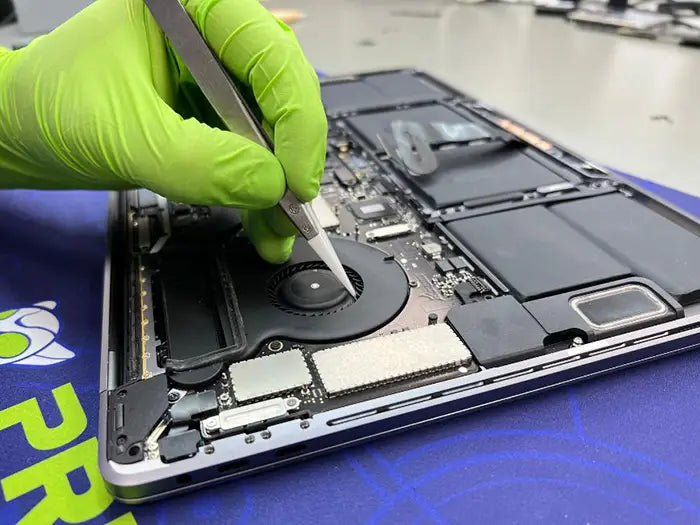
When Should You Replace Your MacBook Battery? Signs, Cost Factors and What to Expect
A MacBook battery does not last forever, but knowing when to replace it is not always straightforward. Your MacBook may still turn on, charge normally, and handle everyday tasks even when its battery has lost a significant amount of its original capacity. In other cases, unexpected shutdowns, unreliable charging, or a macOS battery warning may suggest that the battery needs professional attention.
At Prime Tech Support, we know that replacing a MacBook battery should be a decision based on its actual condition, not simply the age of the computer. A battery with a high cycle count may still provide acceptable performance, while another with fewer cycles may develop problems that affect everyday reliability.
The important question is not just whether your battery is getting older. It is whether replacing it will meaningfully improve your MacBook's usability, reliability, and remaining service life.
In this guide, we explain when a MacBook battery replacement makes sense, how to interpret battery health warnings, what affects replacement costs, and what to expect during professional service. We will also help you determine whether replacing the battery is a worthwhile investment or whether other repairs or a newer MacBook may be the better option.
If your primary concern is excessive power consumption rather than battery age, our guide to MacBook battery draining fast explains how to identify common causes before considering replacement.
Table of Contents
When Does a MacBook Battery Actually Need Replacing?
A MacBook battery does not necessarily need replacing just because it is several years old or has accumulated hundreds of charging cycles. The decision should depend on its condition, reliability, and ability to provide enough power for everyday use.
As lithium-ion batteries age, their capacity gradually decreases. However, normal battery aging is different from a battery that can no longer operate reliably. Understanding that distinction helps avoid unnecessary replacements while identifying problems that deserve professional attention.
1. macOS Displays a "Service Recommended" Warning
One of the clearest indicators is a "Service Recommended" message in macOS Battery Health settings. This warning generally means the battery holds significantly less charge than it did when new or is not functioning normally.
The warning does not automatically mean your MacBook is unsafe to use or that replacement must happen immediately. However, it is a strong reason to evaluate the battery's condition, especially when accompanied by reduced runtime or unexpected shutdowns.
2. Battery Life No Longer Meets Your Daily Needs
A battery may still function normally but provide considerably less runtime than it once did. If your MacBook previously lasted through most of your workday but now requires frequent charging under similar conditions, battery aging may be affecting its usefulness.
Before deciding on replacement, consider whether the change is consistent and whether your workload has changed. More demanding applications, background processes, and software issues can also increase power consumption.
If the battery is otherwise healthy, troubleshooting those factors may be more appropriate than immediately replacing it.
3. Your MacBook Shuts Down Unexpectedly
Unexpected shutdowns while the battery indicator still shows remaining charge can indicate that the battery is struggling to deliver stable power.
For example, a MacBook that repeatedly shuts down at 20% or 30% charge may have a battery whose actual performance no longer matches the remaining-charge estimate.
However, unexpected shutdowns can also result from other hardware or software problems. A professional diagnostic can help determine whether the battery is responsible before replacement.
4. Your MacBook Only Works While Connected to Power
If your MacBook shuts off immediately when the charger is disconnected, the battery may no longer be supplying power correctly.
This can happen when a battery has failed, is not being recognized, or cannot maintain the voltage required for operation. However, battery connections, charging circuitry, and logic board faults can produce similar symptoms.
Replacing the battery without confirming the cause may not resolve the problem.
5. The Battery Shows Signs of Physical Swelling
A swollen battery requires a different level of attention. Warning signs may include a lifting trackpad, a bulging bottom case, an uneven keyboard, or difficulty closing the MacBook properly.
Unlike ordinary capacity loss, swelling is a physical safety concern. Stop using and charging the MacBook, avoid pressing on the affected area, and arrange professional evaluation.
For a more detailed explanation of the risks and appropriate precautions, see our dedicated guide to MacBook battery swelling.
6. Battery Replacement Is More Practical Than Replacing the MacBook
Sometimes the strongest reason to replace a battery is that the rest of the MacBook remains in good condition.
If the display, keyboard, storage, and logic board are functioning properly, and the computer still supports the applications you need, replacing an aging battery may extend its useful life at a substantially lower cost than purchasing another MacBook.
However, if the computer also requires expensive repairs or no longer supports essential software, replacing the battery may not be the most economical decision.
The goal is to evaluate the MacBook as a complete system rather than treating battery age as the only factor.
How to Check Your MacBook Battery Health and Cycle Count
Before investing in a new battery, it is worth checking what macOS reports about your MacBook's current battery condition. Apple provides information that can help you understand battery aging and whether replacement should be considered.
Two indicators are particularly useful: battery health and charge cycle count. Together with your MacBook's actual performance, they provide a clearer picture of whether the battery is approaching the end of its useful life.
Understanding Battery Health in macOS
On supported versions of macOS, you can check battery health by opening the Apple menu, selecting System Settings, and navigating to Battery. Depending on your MacBook model and macOS version, additional information may be available by clicking the information button next to Battery Health.
Apple generally displays one of two battery conditions:
- Normal: The battery is functioning normally, although its capacity may have decreased through regular aging.
- Service Recommended: The battery holds less charge than when it was new or is not functioning normally. Replacement may be appropriate if its condition is affecting everyday use.
A Service Recommended warning does not necessarily mean that the MacBook must stop being used immediately. However, it is a reason to evaluate whether the battery continues to provide acceptable runtime and reliable operation.
Apple explains these conditions in its official MacBook battery Service Recommended documentation.
How to Find Your MacBook Battery Cycle Count
A battery cycle represents the equivalent of using 100% of the battery's capacity, although that usage does not have to occur during a single discharge.
For example, using 50% of your battery one day and another 50% the following day adds up to approximately one complete charge cycle.
To check your MacBook's cycle count:
- Hold the Option key and open the Apple menu.
- Select System Information.
- Under Hardware, select Power.
- Locate Cycle Count in the Battery Information section.
Apple specifies different maximum cycle counts depending on the MacBook model. Many newer MacBook Air and MacBook Pro models are rated for 1,000 cycles, while certain older models have limits of 300 or 500 cycles.
You can verify the rating for your specific computer using Apple's official MacBook battery cycle count reference.
Does Reaching 1,000 Battery Cycles Mean You Need a Replacement?
Not necessarily. Reaching the rated cycle limit is an important indicator of battery aging, but it does not mean every battery suddenly stops working at that number.
Apple designs MacBook batteries to retain up to 80% of their original capacity at their maximum cycle count under specified conditions. Actual battery performance varies depending on usage, temperature, age, and charging patterns.
A MacBook with a high cycle count may still provide sufficient battery life for its owner. Conversely, a battery with relatively few cycles can experience reduced capacity or other problems due to aging or unfavorable operating conditions.
For that reason, cycle count should support the replacement decision rather than determine it by itself.
What About Maximum Battery Capacity?
On supported MacBook models, macOS may also display Maximum Capacity, expressed as a percentage of the battery's original capacity.
For example, a battery reporting 85% maximum capacity has an estimated full-charge capacity of approximately 85% of what it had when new.
Although a capacity reading near or below 80% can be a useful reason to consider replacement, the percentage alone does not establish whether immediate service is necessary.
Someone who regularly works away from an outlet may benefit from replacing a battery sooner than someone who primarily uses their MacBook at a desk.
The most practical decision combines battery condition, cycle count, remaining capacity, and how reliably the MacBook performs during normal use.
Why Battery Health Numbers Do Not Tell the Whole Story
Battery health information is useful, but it does not replace a complete diagnostic when a MacBook behaves unexpectedly.
A battery may report Normal while the computer experiences shutdowns caused by another hardware problem. Similarly, reduced runtime may result from demanding applications, software activity, or increased power consumption rather than battery deterioration alone.
At Prime Tech Support, the goal of battery diagnostics is to determine whether replacement will actually resolve the customer's concern. Evaluating the battery alongside the charging system and overall MacBook condition helps avoid unnecessary repairs.
When Is Replacing a MacBook Battery Worth the Cost?
Replacing a MacBook battery can be a practical investment when the computer still meets your needs and battery deterioration is the main problem affecting its usability. However, not every aging MacBook is worth repairing, and the decision should consider more than the battery's condition alone.
The goal is to determine whether a new battery will provide enough additional useful life to justify the repair expense.
When Battery Replacement Makes Financial Sense
A battery replacement is often worthwhile when the MacBook remains reliable, performs well with your everyday applications, and does not have other significant hardware problems.
Consider replacing the battery when:
- The MacBook still performs well: Its processor, memory, and storage remain sufficient for your everyday tasks.
- Battery life is the primary limitation: You are satisfied with the computer but can no longer depend on its battery away from an outlet.
- The display, keyboard, and logic board are functioning correctly: There are no major additional repairs that would substantially increase the total expense.
- The MacBook supports your essential software: Its operating system and applications remain compatible with your needs.
- The replacement cost is reasonable: Restoring dependable battery life is more economical than purchasing another computer with comparable capabilities.
For example, a MacBook Pro that still handles office work, browsing, and everyday productivity without difficulty may remain useful for years after a properly performed battery replacement. The actual benefit depends on the model, its overall condition, and future software requirements.
When Replacing the Battery May Not Be Worth It
Battery replacement becomes a more complicated decision when the MacBook has several problems or no longer meets your performance requirements.
Before approving the repair, consider whether the computer also has:
- A damaged display or keyboard requiring additional repairs.
- Logic board or charging circuit problems that have not been resolved.
- Storage limitations or hardware failures affecting reliability.
- Insufficient memory or processing performance for your applications.
- Software compatibility limitations that prevent you from using essential programs.
A new battery can restore portable power, but it cannot resolve unrelated hardware failures or make an older processor capable of handling applications beyond its performance limits.
If your MacBook has several performance or reliability problems, our guide to when to maintain, repair, or replace a slow MacBook explains how to evaluate the computer's overall condition before investing in additional service.
Does the MacBook's Age Determine Whether Replacement Is Worthwhile?
Age matters, but it should not be the deciding factor by itself.
An older Intel-based MacBook may still be perfectly suitable for basic productivity, depending on its hardware condition and software requirements. Meanwhile, a newer Apple-silicon MacBook may justify battery replacement because its performance remains more than sufficient for the owner's workload.
When evaluating an older MacBook, consider its remaining software compatibility, physical condition, and expected future use.
A battery replacement may provide excellent value for someone who plans to continue using the computer for everyday tasks. It may provide less value if the owner already needs capabilities that the existing hardware cannot deliver.
Why a Diagnostic Matters Before Approving Replacement
Reduced battery life, unexpected shutdowns, and charging problems do not always originate from the battery itself.
Depending on the symptoms, a technician may need to evaluate the charging adapter, battery connections, charging circuitry, or logic board before recommending replacement.
At Prime Tech Support, our MacBook Pro battery diagnostic and replacement service begins with an evaluation of the problem. Customers receive a repair quote before approving the recommended work, and the diagnostic fee is applied toward the final service cost when the repair proceeds.
This approach helps determine whether replacing the battery will address the actual problem rather than treating every power-related symptom as evidence of battery failure.
Ultimately, the best decision is the one that restores dependable operation at a reasonable cost while keeping the MacBook useful for the work you need it to perform.
What Affects the Cost of a MacBook Battery Replacement?
The cost of replacing a MacBook battery varies depending on the model, battery design, replacement part availability, and the work required to complete the repair safely. There is no single replacement price that applies to every MacBook Air or MacBook Pro.
Before comparing repair quotes, it is important to understand what is included in the service. A proper battery replacement involves more than installing a new component. It also requires confirming the original problem, selecting a compatible battery, and testing the MacBook afterward.
MacBook Model and Year
Different MacBook generations use different battery configurations, internal layouts, and attachment methods. These differences influence both the cost of replacement parts and the labor involved.
For example, an older Intel-based MacBook may require a different battery and removal procedure than a newer Apple-silicon MacBook Pro or MacBook Air.
The exact model identifier is especially important because batteries are not universally interchangeable, even between MacBooks with similar screen sizes.
Battery Installation Complexity
Some MacBook batteries are relatively straightforward to access, while others are secured with strong adhesive or installed within tightly integrated internal assemblies.
Removing an adhesive-secured lithium-ion battery requires appropriate tools, careful handling, and procedures suited to the specific model. Excessive force, bending, or puncturing a battery can create serious safety risks.
More complicated removal procedures can increase the labor required for replacement.
Replacement Battery Quality and Availability
The type and availability of the replacement battery can also influence the final repair cost.
MacBook owners may encounter different battery options, including genuine Apple service parts and third-party replacements. These options are not necessarily equivalent in quality, compatibility, or long-term reliability.
Parts availability can also vary depending on the age and model of the MacBook. A battery for a commonly serviced model may be easier to source than one for an older or less common configuration.
Genuine Apple Batteries vs. Aftermarket Batteries
Understanding the difference between genuine and aftermarket batteries can help MacBook owners evaluate their replacement options.
- Genuine Apple batteries: These are batteries supplied through authorized Apple parts and service channels. Availability and installation requirements depend on the specific model and service arrangement.
- Aftermarket batteries: These are manufactured by third-party suppliers. Their quality, performance, safety characteristics, and compatibility can vary considerably.
A well-manufactured, compatible replacement battery may provide dependable performance, while a poorly manufactured or incompatible battery can introduce charging problems, inaccurate battery reporting, or premature deterioration.
Before approving service, customers should ask about the replacement battery's compatibility, source, and warranty coverage.
At Prime Tech Support, available replacement options should be confirmed for the customer's specific MacBook model before work begins.
Additional Damage or Related Repairs
Sometimes the battery is not the only component requiring attention.
For example, a swollen battery may place pressure on the trackpad or surrounding components. Liquid exposure or charging circuit damage may also require additional diagnostic work.
These problems can affect the overall repair quote, particularly when another component must be repaired before the MacBook can operate reliably.
Customers should receive an explanation of any additional problems before authorizing repairs beyond the original battery service.
Diagnostic Fees and Repair Quotes
At Prime Tech Support, battery-related service begins with a diagnostic to determine whether the battery actually requires replacement or whether another issue is responsible for the symptoms.
The diagnostic fee is separate from the final repair quote and is applied toward the final service cost when the customer approves the repair. The diagnostic charge itself is non-refundable.
Customers can review our MacBook Pro battery replacement service or MacBook Air battery replacement service to learn more about the diagnostic and repair process.
The final replacement quote depends on the MacBook model, the condition of the device, and the required parts and labor. This allows customers to make an informed decision before proceeding with the repair.
What to Expect During a Professional MacBook Battery Replacement
Once a diagnostic confirms that your MacBook needs a new battery, the next step is understanding what the replacement involves. Although the procedure varies between MacBook Air and MacBook Pro models, a professional service should include careful battery removal, compatible replacement parts, and testing before the computer is returned.
At Prime Tech Support, our MacBook battery service follows a diagnostic, repair, and quality assurance process designed to identify the actual problem and confirm that the recommended work has resolved it.
Step 1: Battery Diagnostics and Initial Inspection
Before replacing the battery, the technician evaluates its condition and the symptoms reported by the customer.
Depending on the MacBook model and the problem, this may involve checking battery health information, charging behavior, battery connections, and related power circuitry.
This initial evaluation is important because a MacBook that shuts down unexpectedly or refuses to charge does not necessarily have a defective battery.
If the problem involves physical battery expansion, additional precautions are necessary. Our guide to MacBook battery swelling and safety explains why these cases require particular care.
Step 2: Repair Quote and Customer Approval
After identifying the problem, Prime Tech Support provides a diagnostic report and repair quote outlining the recommended service.
The quote allows the customer to review the repair cost and approve the work before replacement begins. If diagnostics reveal that the charging system or another component is responsible, the recommended repair may differ from a standard battery replacement.
Battery compatibility and replacement part availability are also considered before proceeding.
Step 3: Safe Removal of the Existing Battery
MacBook batteries are installed differently depending on the model and generation. Many use adhesive-secured lithium-ion cells that require careful removal.
The technician opens the MacBook, follows the appropriate battery isolation procedures, and removes the existing battery using tools and techniques suited to the model.
Care is taken to avoid damaging the battery cells, nearby cables, trackpad, or other internal components.
Battery removal is not a procedure that should be attempted casually. Puncturing, bending, or overheating a lithium-ion battery can create serious safety hazards, particularly when the battery is already damaged or swollen.
Step 4: Installation of the Replacement Battery
Once the original battery has been removed, the replacement is installed according to the MacBook's design and compatibility requirements.
The technician verifies that the battery is correctly positioned, secured, and connected. The MacBook is also inspected for issues that could interfere with charging or normal operation.
If the computer has accumulated significant internal dust, cleaning may be recommended as an additional maintenance service. However, battery replacement does not automatically require extensive cooling-system maintenance.
Step 5: Battery Testing and Quality Assurance
Installing the replacement battery is not the final step. The MacBook must also be tested to confirm that the repair has resolved the original problem.
Post-repair checks may include:
- Confirming that macOS recognizes the installed battery.
- Checking that the battery charges and reports its status correctly.
- Verifying operation while connected to and disconnected from external power.
- Checking the trackpad, keyboard, and case alignment.
- Inspecting for abnormal behavior or remaining power-related symptoms.
These checks are especially important when the original battery was swollen or when the MacBook had previously experienced unexpected shutdowns.
How Long Does a MacBook Battery Replacement Take?
Repair time depends on the MacBook model, battery availability, installation complexity, and whether additional problems are discovered during diagnostics.
Many battery replacements can be completed the same day once the correct part is available. However, customers should confirm the estimated completion time for their specific MacBook before scheduling service.
Prime Tech Support also provides warranty coverage for completed repairs, with applicable terms explained as part of the service.
For additional information about the diagnostic, replacement, and quality assurance process, visit our MacBook Pro battery replacement service.
A Real MacBook Battery Replacement Case from Our Repair Lab
Battery replacement can be particularly worthwhile when an older MacBook still meets its owner's needs but has become less practical to use because of battery deterioration.
One example from our repair experience at Prime Tech Support involved a 2015 MacBook Pro that had developed poor battery life and noticeable performance concerns.
The Problem: Short Battery Life and an Aging MacBook
The customer brought in a 2015 MacBook Pro that was no longer providing dependable battery life. The computer also felt slower than expected, raising questions about whether additional repairs were necessary or whether replacing the MacBook would be a better investment.
Rather than assuming that the computer needed to be replaced because of its age, our technicians inspected its condition to identify which maintenance and repair services could improve its usability.
What Our Technicians Found
During the internal inspection, our technicians discovered that the MacBook's battery had already been replaced previously with a non-original unit.
The computer also had substantial dust accumulation inside its cooling system, including the fans and surrounding internal areas.
These findings highlighted two separate maintenance concerns: an aging replacement battery affecting portable use and accumulated dust that could interfere with effective cooling.
Although these problems can occur together in older MacBooks, they should be evaluated separately. A new battery does not automatically resolve thermal or performance problems caused by dust buildup.
The Repair: Battery Replacement and Internal Maintenance
After evaluating the MacBook, our technicians performed several services:
- Battery replacement: The previously installed battery was removed and replaced with a compatible unit.
- Internal cleaning: Dust was removed from the cooling fans and internal areas to improve airflow.
- Exterior maintenance: The worn rubber feet were replaced to restore proper support when the MacBook was placed on a desk.
Addressing these issues together helped restore the MacBook's everyday usability without requiring the customer to purchase an entirely new computer.
The Result: A More Practical MacBook for Everyday Use
Following the battery replacement and maintenance, the MacBook provided more dependable battery life and operated more quietly and at lower temperatures.
It is important to distinguish the benefits of each service. The battery replacement addressed the portable power problem, while the internal cleaning helped improve cooling conditions.
This case demonstrates why evaluating the overall condition of an older MacBook can be more useful than making a repair decision based on its age alone.
What This Case Teaches MacBook Owners
A MacBook does not necessarily need to be replaced simply because its battery has deteriorated. When the rest of the computer remains functional and supports the owner's applications, targeted repairs may extend its useful life.
However, combining battery replacement with other maintenance should be based on the computer's actual condition, not treated as an automatic requirement.
For MacBooks experiencing elevated temperatures or excessive fan activity, our separate guide to MacBook overheating and thermal diagnostics explains why cooling problems require their own evaluation.
The most important lesson is that battery replacement should be considered as part of the MacBook's overall condition, expected remaining lifespan, and the customer's actual needs.
How to Make Your New MacBook Battery Last Longer
Replacing a worn MacBook battery can restore dependable portable use, but the way you charge, store, and maintain your computer will influence how the new battery ages.
All lithium-ion batteries gradually lose capacity over time. Although this process cannot be completely prevented, a few practical habits can help reduce unnecessary wear and preserve battery performance.
Use Optimized Battery Charging
Apple includes Optimized Battery Charging on supported MacBook models to help reduce battery aging. The feature learns your charging habits and can delay charging beyond 80% in certain situations, reducing the time the battery spends fully charged.
Depending on your macOS version, you can review this feature under System Settings > Battery > Battery Health or the available charging options.
Keeping this feature enabled is generally a sensible choice, especially if your MacBook spends long periods connected to external power.
Avoid Excessive Heat
Heat is an important factor in lithium-ion battery aging. Regular exposure to high temperatures can accelerate battery deterioration, even when the battery is relatively new.
To reduce unnecessary heat exposure:
- Avoid leaving your MacBook inside a parked car or in direct sunlight.
- Use the computer on a stable surface that allows adequate ventilation.
- Avoid blocking cooling vents with blankets, pillows, or other soft materials.
- Have persistent overheating or abnormal fan behavior evaluated rather than assuming it is normal.
Battery maintenance and cooling-system maintenance address different problems, but both contribute to the computer's long-term reliability.
Use Compatible Charging Equipment
Use charging adapters and cables that meet your MacBook's power requirements. An incompatible, damaged, or inadequate charger may cause unreliable charging or prevent the computer from receiving sufficient power during demanding workloads.
If charging problems continue after a battery replacement, the adapter, cable, charging port, and internal power circuitry may require further evaluation.
Avoid Leaving the Battery Completely Discharged During Storage
If you plan to store your MacBook for an extended period, avoid putting it away with a completely depleted battery.
For long-term storage, Apple recommends approximately 50% charge before turning off the device and storing it in a cool, dry environment.
For everyday use, you do not need to deliberately discharge the battery to 0% before recharging. Partial charging is normal for modern lithium-ion batteries.
Keep macOS Updated and Monitor Battery Health
Keeping macOS updated helps maintain compatibility with Apple's power-management features and other system improvements.
It is also useful to review battery health periodically, particularly if you notice a significant change in runtime or charging behavior.
However, there is no need to constantly monitor cycle counts or battery percentages. The objective is to recognize meaningful changes in performance, not to treat every normal fluctuation as a problem.
With appropriate charging habits, reasonable temperature management, and periodic maintenance, a replacement battery can provide years of useful service, depending on the MacBook model and how it is used.
MacBook Battery Replacement in Miami: When to Schedule Professional Service
If your MacBook displays a Service Recommended warning, no longer provides dependable battery life, or shuts down unexpectedly, it may be time to schedule a professional battery evaluation.
At Prime Tech Support, our Miami repair lab provides battery diagnostics and replacement services for compatible MacBook Air and MacBook Pro models. Our technicians evaluate the battery and related power components before recommending a repair, helping customers avoid unnecessary replacements.
Whether you use an older Intel-based MacBook or a newer Apple-silicon model, the first step is determining whether battery replacement is the most practical solution for your computer.
Professional Battery Service for MacBook Air and MacBook Pro
Our repair services include evaluating battery-related symptoms, confirming replacement compatibility, and testing the computer after the approved repair.
You can explore the appropriate service for your device:
- MacBook Pro battery replacement for compatible MacBook Pro models.
- MacBook Air battery replacement for compatible MacBook Air models.
Repair costs and completion times depend on the model, battery availability, and findings from the diagnostic evaluation. Customers receive a quote before authorizing the recommended work.
Visit Our Miami Repair Lab or Ask About Mail-In Service
Prime Tech Support serves customers throughout Miami-Dade County from our professional repair lab at 130 NW 36th St, Miami, FL 33127.
For customers outside Miami, mail-in repair options may also be available depending on the MacBook model and service requirements.
Whether you are experiencing unreliable battery life or considering replacement for an aging MacBook, our team can help you determine the next step.
Final Thoughts: Replace the Battery When It Makes Sense
A MacBook battery should be replaced when its condition affects the computer's reliability, portability, or everyday usefulness—not simply because the MacBook has reached a certain age or cycle count.
For a MacBook that remains in good condition, battery replacement can be a cost-effective way to extend its useful life. However, when additional hardware problems or software limitations are present, a broader evaluation may reveal a better long-term option.
At Prime Tech Support, our priority is identifying the actual problem and recommending a repair that makes sense for the customer and the computer.
Is It Time to Replace Your MacBook Battery?
Don't replace your MacBook—or its battery—without knowing what is causing the problem. Prime Tech Support provides professional MacBook battery diagnostics and replacement services in Miami, with mail-in options available for eligible repairs.
Explore our MacBook Pro battery service or MacBook Air battery service, or call 855-600-6999 to discuss your repair.
Compartir este

Artículos relacionados sobre reparación de Mac

Entradas populares

FAQ When to Replace Your MacBook Battery: Signs & Cost
How much does it cost to replace a MacBook battery?
Is it worth replacing the battery in an old MacBook?
Can I keep using my MacBook if it says Service Recommended?
I replace my MacBook battery after 1,000 cycles?
At what battery health percentage should I replace my MacBook battery?
How do I know when my MacBook battery needs replacing?
¿Tu MacBook no funciona? Obtén un diagnóstico experto y opciones de reparación
Si tu MacBook está experimentando problemas, obtener un diagnóstico adecuado es el primer paso. Muchos problemas que parecen fallas importantes a menudo pueden resolverse con reparaciones a nivel de componente específicas.
En Prime Tech Support, nos especializamos en diagnósticos y reparaciones avanzados de MacBook, incluidos problemas que otras tiendas pueden no ser capaces de resolver.
¿En Miami? Obtén servicio de reparación de Mac local
Nuestro equipo está listo para ayudarte. Ofrecemos reparaciones el mismo día
¿No estás en Miami? Usa Nuestro Servicio de Reparación de Mac por Correo
Ofrecemos reparaciones seguras por correo a nivel nacional con tiempos de respuesta rápidos y diagnósticos profesionales.
Explora más guías de reparación de MacBook
Ver todo-

MacBook won't turn on? Learn how to identify charging problems, battery failures, and logic board issues. Explore safe troubleshooting steps,...
MacBook Won't Turn On? Causes, Quick Checks and Repair Options
MacBook won't turn on? Learn how to identify charging problems, battery failures, and logic board issues. Explore safe troubleshooting steps,...
-

Not sure whether your MacBook battery needs replacing? Learn how to recognize battery wear, interpret macOS battery health warnings and...
When Should You Replace Your MacBook Battery? Signs, Cost Fact...
Not sure whether your MacBook battery needs replacing? Learn how to recognize battery wear, interpret macOS battery health warnings and...
-

MacBook Wi-Fi stopped working after a macOS update? Learn how to troubleshoot network settings, DHCP, DNS, VPN conflicts, and possible...
MacBook Wi-Fi Not Working After a macOS Update? Causes and Fixes
MacBook Wi-Fi stopped working after a macOS update? Learn how to troubleshoot network settings, DHCP, DNS, VPN conflicts, and possible...