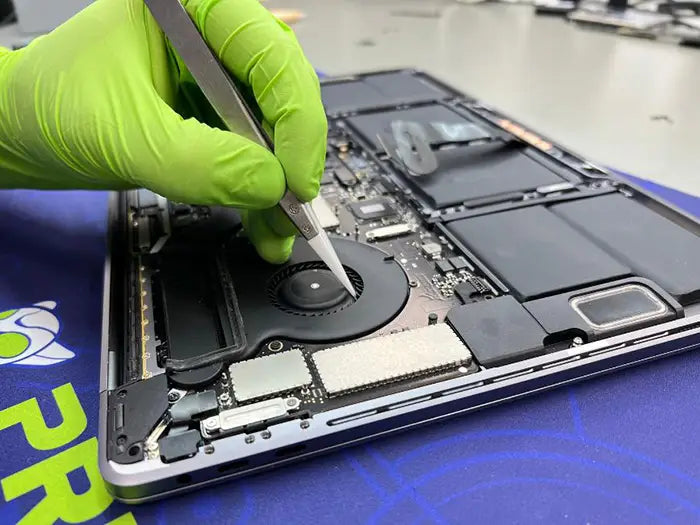
MacBook Logic Board Repair: Causes, Diagnosis & Cost Guide
A MacBook logic board is the main circuit board that controls power, charging, startup, display output, storage access, keyboard and trackpad input, USB-C ports, and many of the computer’s other core functions. MacBook logic board repair means diagnosing and fixing board-level faults instead of automatically replacing the entire board.
Not every serious MacBook symptom means the whole logic board is dead. A MacBook that will not turn on, will not charge, shows a black screen, or keeps restarting may have a failed charging circuit, USB-C issue, battery problem, display-path fault, liquid damage, or a repairable board-level component failure. A proper diagnostic is what separates a targeted repair from an unnecessary replacement.
What MacBook logic board repair may address: Faults involving power delivery, battery charging, USB-C communication, startup, display output, storage access, and other circuits located on or controlled by the logic board.
Common causes include liquid damage, charging circuit failure, USB-C port or controller failure, thermal stress, physical impact, and failed chips or power components. The right repair decision depends on which circuit failed, what diagnostic testing reveals, and whether component-level repair or full board replacement makes more sense for your MacBook model.
This guide is for MacBook owners dealing with serious symptoms such as:
- A MacBook that will not turn on
- A black screen or no visible image
- A battery that will not charge
- USB-C ports that are not responding
- Boot loops or startup failure
- Random shutdowns
- Liquid damage
- A burning smell or visible corrosion
- Suspected board-level failure
If your MacBook still turns on normally and you are only dealing with a minor software glitch, basic macOS troubleshooting may be the better place to start. However, if the MacBook has no power, charging failure, liquid exposure, or several internal systems failing at the same time, logic board diagnosis may be the next reasonable step.
If you are already past the basic checks and want to avoid replacing the wrong part, begin with the diagnostic service that matches your model. A MacBook Pro diagnostic or MacBook Air diagnostic can help determine whether the issue is coming from the battery, charger, USB-C circuit, display path, liquid damage, or the logic board before repair decisions are made.
Table of Contents
What Is a MacBook Logic Board and Why Does It Fail?
The logic board is the central circuit board inside every MacBook. It connects and controls the major systems that allow the computer to power on, charge, display video, access storage, and respond to user input.
In simple terms, the logic board coordinates:
- Power delivery
- Battery charging
- Startup sequence
- Display output
- Storage access
- USB-C communication
- Keyboard and trackpad input
- Audio, wireless, and other internal systems
When the logic board is functioning properly, these systems initialize and communicate in the correct order. If a single circuit fails, the entire MacBook can appear completely dead—even though most of the board may still be working normally.
The Logic Board's Role in Power, Charging, Display, Storage, and Startup
The logic board houses or connects to many of the MacBook's most important components. Depending on the model, this includes the CPU or Apple silicon chip, memory, storage connections or integrated storage, power-management circuits, charging circuits, display outputs, USB-C controllers, keyboard and trackpad controllers, audio components, and wireless hardware.
Because everything is interconnected, a failure in one small section of the board can create symptoms that seem unrelated.
For example:
- A charging circuit fault may make the MacBook appear completely dead.
- A display output or backlight circuit issue may produce a black screen while the computer is still running.
- A power rail problem may cause random shutdowns or boot loops.
- Liquid damage near a connector may affect the keyboard, trackpad, USB-C ports, or charging behavior.
- A failed component can prevent power from reaching the rest of the system.
Technician Tip: A MacBook that will not power on does not automatically need a new logic board. One failed charging IC, power rail, USB-C controller, or other board-level component can produce the same symptoms. That's why professional diagnostics always come before recommending replacement.
Logic Board vs. Motherboard: What's the Difference?
"Logic board" is Apple's term for the main circuit board inside a MacBook. "Motherboard" is the more common name used in the PC industry.
If you've searched for terms such as MacBook motherboard repair, MacBook motherboard replacement, or MacBook motherboard repair in Miami, you're generally referring to the same component.
This guide uses logic board because it's Apple's terminology and the standard term used by professional Mac repair technicians.
If you're specifically comparing repair versus replacing the entire board, our MacBook Pro Logic Board Replacement Guide explains when replacement becomes the better option.
Why Logic Board Symptoms Often Look Like Other Problems
One of the biggest mistakes people make is assuming every serious MacBook symptom points directly to the logic board. In reality, many board-level symptoms can also be caused by other components.
A MacBook that won't turn on may actually have:
- A failed charger
- A damaged USB-C cable
- A faulty USB-C port
- A deeply discharged or swollen battery
- A shorted charging circuit
- A board-level power fault
A MacBook with a black screen may have:
- A damaged display
- A failed display cable
- A backlight issue
- A graphics-output problem
- A logic board fault
A MacBook that freezes or repeatedly restarts may be experiencing:
- macOS corruption
- Firmware issues
- Storage failure
- Battery health problems
- Overheating
- Power instability on the logic board
That overlap is exactly why professional diagnosis matters. Before approving an expensive repair, technicians isolate the true failure point to determine whether the issue is the battery, display, charging system, storage, USB-C circuitry, or the logic board itself.
If your MacBook won't power on, has charging problems, or several hardware systems are failing together, schedule a professional MacBook diagnostic before replacing parts.
MacBook Logic Board Failure Symptoms
Recognizing the right symptom pattern is the first step toward an accurate MacBook logic board diagnosis. The challenge is that logic board failure symptoms often overlap with battery, display, charger, USB-C port, storage, and macOS problems.
That means one symptom alone is rarely enough to confirm a failed logic board. A MacBook that will not turn on may have a board-level power issue, but it may also have a bad charger, damaged USB-C port, dead battery, or liquid-related short. A black screen may point to the logic board, but it may also come from the display, backlight, or display cable.
The goal is to evaluate the complete symptom pattern before replacing any parts.
MacBook Will Not Turn On
A MacBook that will not turn on is one of the most common reasons owners suspect logic board failure.
Typical signs include:
- No fan activity
- No startup chime (on supported models)
- No display activity
- No trackpad click or haptic feedback
- No keyboard response
- No charging indicator or USB-C power response
- No change when using a known-good charger
These symptoms may indicate a failed power rail, charging circuit fault, damaged USB-C controller, or another board-level issue. However, they can also be caused by a failed charger, battery, or charging cable.
A no-power MacBook should always go through safe external checks before board-level testing begins.
Black Screen or No Image
A black screen does not always mean the MacBook has no power. These are two different symptom categories.
If the MacBook becomes warm, the fans spin, keyboard lights respond, or the Caps Lock key reacts, the computer may actually be starting while failing to display an image.
Possible causes include:
- Failed display cable
- Damaged LCD panel
- Backlight circuit failure
- Graphics output fault
- Logic board failure
- Liquid or impact damage affecting the display path
Before assuming the logic board is defective, it's important to rule out the display assembly itself. Many display-related issues are covered in our MacBook Screen Issues Repair Guide.
If your MacBook powers on but shows vertical lines, artifacts, or distorted graphics, our MacBook Screen Lines Guide explains how display-path failures can sometimes resemble logic board problems.
Random Shutdowns, Freezing, or Boot Loops
Unexpected shutdowns, freezing, or restart loops are more difficult to diagnose because they may be caused by either software or hardware.
A MacBook that shuts down unexpectedly, freezes under load, or continually restarts may have:
- Power rail instability
- Failing power-management components
- Overheating
- Battery health problems
- Storage failure
- Firmware issues
- macOS corruption
- Liquid-related board damage
The pattern matters. If the problem started immediately after a macOS update, software should be investigated first. If the MacBook shuts down under load, overheats, or continues restarting after software recovery attempts, hardware becomes much more likely.
Battery Not Charging or USB-C Port Failure
Charging problems are frequently mistaken for complete logic board failure, especially on USB-C MacBook models.
You may notice symptoms such as:
- Battery percentage never increases
- Only one USB-C port charges
- No charger is recognized
- USB-C accessories are not detected
- The MacBook only charges at certain cable angles
- The computer only works while plugged in
These symptoms may involve the USB-C port, charging cable, battery, charging controller, or another board-level circuit. They do not automatically mean the entire logic board needs replacement.
Learn more about this type of problem in our USB-C Failures on MacBook Pro Guide.
Liquid Damage, Corrosion, or a Burning Smell
Liquid exposure changes the situation completely. If your MacBook has been exposed to water, coffee, soda, alcohol, or another liquid, avoid repeatedly trying to power it on.
Warning signs include:
- Visible corrosion
- Sticky keyboard or trackpad
- Charging problems after a spill
- Random shutdowns
- Black screen following liquid exposure
- Burning smell
- The MacBook becomes warm but never starts
- Intermittent charging or USB-C response
Corrosion often spreads underneath shields and connectors where it cannot be seen without opening the computer. Continued power attempts can turn a repairable board into one with significantly more damage.
Technician Tip: The most valuable clue isn't a single symptom—it's the combination of symptoms. A MacBook with no power after liquid exposure follows a very different diagnostic path than one that simply has a worn battery or damaged display cable.
Common Symptom Patterns
| Symptom | Possible Logic Board Cause | Could Also Be | Recommended Next Step |
|---|---|---|---|
| No power | Power rail failure or short circuit | Battery, charger or USB-C port | Perform safe external checks, then diagnostics |
| Black screen | Graphics or display-output circuit | Display assembly or backlight | Rule out the screen first |
| Battery won't charge | Charging circuit or USB-C controller | Adapter, cable or battery | Test multiple chargers before assuming board failure |
| Random shutdowns | Power-management instability | Battery, overheating or macOS | Check software, cooling, then diagnostics |
| Burning smell or corrosion | Liquid damage or board short | Battery failure | Stop using the MacBook immediately |
When several hardware systems begin failing together—charging, display, keyboard, USB-C, or startup—the safest next step is a professional MacBook diagnostic to identify the actual failed circuit before replacing expensive components.
Safe Checks Before Assuming Logic Board Failure
Before assuming your MacBook needs logic board repair, work through a few safe external checks. These steps do not require opening the MacBook or removing any internal components.
The goal is to rule out simple causes first, such as a failed charger, damaged cable, faulty outlet, USB-C accessory conflict, swollen battery, or a temporary startup issue. If these checks do not change the symptoms, the next step is a professional diagnosis—not guessing which part to replace.
Check the Charger, Cable, Outlet, and Accessories
Start with the power source. A MacBook that appears completely dead may simply not be receiving stable power.
Before assuming the logic board has failed, try the following:
- Use a known-good Apple charger or a compatible charger with the correct wattage.
- Test with another USB-C or MagSafe cable, depending on your MacBook model.
- Plug into a different wall outlet.
- Disconnect all external accessories.
- Remove USB-C hubs, docks, external monitors, storage devices, and adapters.
- Inspect the charging port for debris or visible damage.
Some MacBooks may refuse to charge properly if a connected USB-C accessory interferes with power negotiation. Testing with only the charger connected helps eliminate those variables.
If the MacBook responds after changing the charger, cable, outlet, or charging port, the issue may be related to the power accessories rather than the logic board.
Hold the Power Button and Disconnect External Devices
If there is still no response, follow Apple's recommended no-power troubleshooting steps before assuming a hardware failure.
Apple recommends disconnecting accessories and attempting a fresh startup sequence, depending on your MacBook model. You can review the official instructions in Apple's Mac won't turn on troubleshooting guide.
This procedure will not repair a damaged charging circuit or failed logic board, but it can resolve a frozen power state or accessory conflict that makes the MacBook appear completely dead.
This step is especially useful when:
- The MacBook does not respond to the power button.
- The display remains black.
- The charger appears connected but nothing changes.
- The problem started after waking from sleep.
- The MacBook stopped responding after an interrupted startup.
Look for Signs of a Swollen Battery
Before continuing, inspect the MacBook from the outside. Do not open the computer if you are not trained to do so.
Look for signs that the battery may have expanded and is putting pressure on internal components.
Common warning signs include:
- The bottom case appears raised.
- The trackpad feels stiff or difficult to click.
- The MacBook rocks when sitting on a flat surface.
- Visible gaps appear around the chassis.
- The keyboard or trackpad changed behavior before the startup issue appeared.
A swollen battery can interfere with normal operation and may place pressure on the logic board, trackpad, and other internal components. Continuing to use the computer may create additional damage.
Learn more about these warning signs in our MacBook Swollen Battery Safety Guide.
Technician Tip: A swollen battery and a failed logic board can produce similar symptoms, including charging problems and a MacBook that won't power on. Always rule out battery swelling before assuming a board-level failure.
Run Apple Diagnostics (If the MacBook Still Starts)
If the MacBook powers on far enough to begin the startup process, Apple Diagnostics can help identify certain hardware issues.
Depending on the model, it may report problems involving:
- Battery health
- Power systems
- Storage devices
- Memory
- Wireless hardware
- Other internal components
Apple Diagnostics is most useful when the MacBook is still capable of starting. It is much less helpful on computers with no power, severe liquid damage, or active short circuits.
You can find Apple's official instructions here: Apple Diagnostics for Mac.
When to Stop Troubleshooting
Some symptoms indicate that home troubleshooting should stop immediately.
Do not continue powering on the MacBook if you notice:
- Liquid exposure.
- A burning smell.
- Visible corrosion.
- The charger or USB-C port becoming unusually hot.
- The MacBook warming up without completing startup.
- Repeated startup attempts followed by immediate shutdown.
- A swollen battery.
- Recent drop or physical impact followed by hardware failures.
Repeated power attempts after liquid exposure can spread corrosion and permanently damage components that may have been repairable.
Safe Checks Before Logic Board Diagnosis
| Check | What It Helps Rule Out | Next Step |
|---|---|---|
| Try another charger and cable | Faulty charger, cable, or incorrect wattage | If the MacBook responds, replace the defective accessory. |
| Test another outlet | Power source issue | Verify stable wall power before assuming hardware failure. |
| Disconnect accessories | USB-C hub or dock conflicts | Reconnect devices one at a time after startup. |
| Hold the power button | Temporary startup or power-state issue | If nothing changes, continue with diagnostics. |
| Inspect for battery swelling | Battery expansion or internal pressure | Stop using the MacBook if the chassis or trackpad is raised. |
| Run Apple Diagnostics | Hardware error codes | Save any error codes before contacting a technician. |
| Stop after liquid damage or burning smell | Corrosion or active short circuits | Arrange a professional inspection immediately. |
Not Sure If It's Really the Logic Board?
Many MacBooks that appear to have logic board failure actually turn out to have charging problems, battery issues, USB-C failures, display faults, or liquid damage affecting only one circuit.
A professional diagnostic identifies the exact cause before expensive parts are replaced, helping you avoid unnecessary repairs and protecting your data whenever possible.
How MacBook Logic Board Diagnosis Works
A proper MacBook logic board diagnosis is not guesswork. It is a systematic process that isolates the failed area of the board and determines whether the best solution is component-level repair, full logic board replacement, data recovery, battery service, display repair, or another repair path.
This matters because the same symptom can have several different causes. A MacBook with no power may have a board-level short, but it could also have a failed battery, damaged USB-C circuit, liquid damage, or a charging problem. Likewise, a MacBook with a black screen should have the display path tested before the logic board is blamed.
The purpose of a professional diagnosis is to answer three important questions:
- Which circuit or subsystem has failed?
- Can the problem be repaired at the component level?
- Is repair, replacement, or another service the safest and most cost-effective solution?
Visual Inspection and Liquid Damage Evaluation
The first step is a careful visual inspection under magnification. Technicians look for physical evidence that cannot be seen from outside the MacBook.
This inspection may reveal:
- Liquid residue
- Corrosion around connectors
- Burned or discolored components
- Damaged board traces
- Loose or damaged connectors
- Signs of impact or board flex
- Corrosion hidden beneath shields or around USB-C ports
On liquid-damaged MacBooks, corrosion is often hidden underneath shielding or around power-management components. A MacBook can look perfectly clean on the outside while significant board-level damage continues to spread internally.
This inspection also determines whether it is safe to continue electrical testing. If active corrosion or an electrical short is present, applying power too early may cause additional damage.
Power Rail and Short-Circuit Testing
After the visual inspection, technicians begin testing the board's power rails.
Power rails distribute the specific voltages required by different sections of the logic board. If just one power rail becomes shorted or unstable, the entire MacBook may fail to start.
Using a laboratory bench power supply allows controlled testing without applying full operating power to a potentially damaged board. This helps identify short circuits while minimizing the risk of further damage.
These measurements reveal whether the problem is isolated to a single circuit or affects multiple areas of the board.
Charging Circuit and USB-C Testing
Modern MacBooks rely on USB-C ports for both charging and data communication, making charging problems more complex than many users realize.
During diagnosis, technicians evaluate:
- USB-C port communication
- USB-C controller operation
- Charging IC performance
- Power-path components
- Battery charging communication
- Voltage negotiation between the charger and the MacBook
If the MacBook charges on one port but not another, refuses to recognize chargers, or only works with certain adapters, these circuits are tested individually before concluding that the entire logic board has failed.
Isolating the Display, Battery, Storage, Keyboard, and Trackpad
The logic board communicates with nearly every major subsystem inside the MacBook. A failure in one connected component can easily imitate a logic board problem.
During diagnosis, technicians isolate systems such as:
- Display and backlight circuits
- SSD or integrated storage
- Keyboard and trackpad communication
- Battery charging and power delivery
- USB-C ports and external devices
- Audio, camera, and wireless hardware
For example, a black screen may actually be caused by the display assembly instead of the logic board. Likewise, a charging issue may originate from the battery, charging cable, USB-C controller, or charging circuit.
Subsystem isolation prevents replacing expensive parts unnecessarily and helps determine whether the MacBook needs board repair, battery replacement, display service, or another repair entirely.
Technician Tip: At Prime Tech Support, technicians isolate every subsystem before recommending a logic board replacement. Many MacBooks that arrive with "dead logic board" diagnoses from elsewhere are ultimately repaired by addressing a charging circuit, battery, display path, or another isolated component.
Why Diagnostics Come Before Cost Estimates
A reliable repair estimate depends on knowing exactly what has failed.
A MacBook that will not turn on could require:
- A small component-level repair
- A charging circuit repair
- Battery replacement
- Display-path repair
- Data recovery
- Full logic board replacement
Because the possibilities vary so much, any quote given before diagnosis should be considered only a rough estimate.
A professional diagnostic confirms:
- Whether liquid damage is present
- Whether the short circuit is isolated or widespread
- Whether the charging circuit is repairable
- Whether another component is actually causing the symptoms
- Whether data recovery should be prioritized
- Whether component-level repair or replacement is the better option
MacBook Logic Board Diagnostic Process
| Diagnostic Step | What It Reveals | Why It Matters |
|---|---|---|
| Visual inspection | Corrosion, liquid residue, impact damage, burned components | Identifies visible board damage before electrical testing begins. |
| Bench power supply testing | Short circuits and abnormal current draw | Safely locates faults without causing additional damage. |
| Power rail measurements | Missing or unstable voltages | Pinpoints which circuit has failed. |
| Charging and USB-C testing | Controller behavior and charging path integrity | Determines whether charging issues require board repair. |
| Subsystem isolation | Battery, display, storage, keyboard, trackpad and USB-C systems | Prevents replacing the wrong component. |
| Component-level testing | Individual chips, MOSFETs, capacitors, resistors and board traces | Determines whether microsoldering repair is possible. |
If your MacBook still has no power, won't charge, displays a black screen, or shows signs of liquid damage after the basic checks, schedule a professional MacBook diagnostic to identify the failed circuit before approving an expensive repair.
Common Causes of MacBook Logic Board Damage
Understanding what caused the logic board failure matters because the underlying cause affects the repair method, the likelihood of successful component-level repair, the potential risk to your data, and the overall cost.
A MacBook with a dry charging circuit failure is diagnosed very differently from one with liquid corrosion, impact damage, or widespread board-level shorts.
The most common causes of MacBook logic board damage include:
- Liquid exposure and corrosion
- Failed USB-C or charging circuits
- Overheating and long-term thermal stress
- Physical impact or board flex
- Failed chips, capacitors, MOSFETs, resistors, or damaged board traces
Although these failures can produce similar symptoms—such as no power, black screen, charging problems, boot loops, or random shutdowns—the correct repair depends on identifying the actual cause through professional diagnostics.
Liquid Damage and Corrosion
Liquid exposure remains one of the leading causes of MacBook logic board failure. Water, coffee, soda, alcohol, and even cleaning solutions can reach sensitive electronic components inside the computer, even when the spill appears minor.
The damage is not always immediate. A MacBook may continue working for days or even weeks before corrosion begins affecting charging circuits, power rails, USB-C controllers, display circuits, or other critical components.
Liquid damage can affect:
- Power rails
- Charging circuits
- USB-C controllers
- Keyboard and trackpad connectors
- Display and backlight circuits
- Storage communication
- Board traces and microscopic power components
If liquid exposure occurred and your files are important, data recovery should often be considered before repeatedly attempting to power on the MacBook.
Learn more in our MacBook Liquid Damage Data Recovery Guide.
Technician Tip: Many liquid-damaged MacBooks continue working immediately after a spill. Corrosion develops over time, which is why symptoms often appear days or even weeks later. If your problems began after any liquid exposure—even if it seemed minor—tell your technician during the diagnostic.
Failed Charging Circuits or USB-C Ports
Modern MacBooks depend heavily on USB-C for both charging and data communication. Because of this, charging problems often involve much more than the battery itself.
Common symptoms include:
- The MacBook will not charge on any port.
- Only one USB-C port works.
- The battery percentage never increases.
- USB-C accessories are not detected.
- The MacBook only charges with certain chargers.
- Charging starts and stops unexpectedly.
- USB-C ports feel loose or physically damaged.
A charging circuit problem may involve the USB-C controller, charging IC, power-path components, or communication between the charger and the logic board. In many cases, these faults can be repaired without replacing the entire board.
If your symptoms involve charging instability or non-responsive USB-C ports, read our USB-C Failures on MacBook Pro Guide.
Overheating and Thermal Stress
MacBooks are engineered to operate within strict thermal limits, but years of heavy workloads, clogged cooling systems, deteriorated thermal paste, or failed cooling fans can place continuous stress on sensitive electronic components.
Long-term overheating may affect:
- Power-management components
- Graphics circuits
- Memory interfaces
- Charging components
- Solder joints
- Nearby board traces
Thermal-related failures usually develop gradually rather than suddenly. Symptoms may include random shutdowns, boot loops, freezing under load, excessive fan noise, or intermittent startup failures.
While overheating does not automatically mean the logic board is damaged, persistent problems after cooling maintenance and software troubleshooting often justify board-level diagnostics.
Physical Impact or Board Flex
A drop, bent chassis, excessive pressure, or hinge damage can create microscopic failures that are impossible to see without magnification.
Impact damage may cause:
- Cracked solder joints
- Damaged connectors
- Broken board traces
- Loose internal cables
- Display-path faults
- Charging instability
- Intermittent power problems
Some failures appear immediately after an accident, while others develop gradually as the MacBook is repeatedly opened, closed, heated, and cooled during normal use.
Failed Chips, Power Components, or Board Traces
Not every logic board failure is caused by liquid, overheating, or impact. Individual electronic components can simply fail over time.
Common board-level failures involve:
- Power management ICs
- Charging ICs
- USB-C controllers
- MOSFETs
- Capacitors
- Resistors
- Fuses
- Inductors
- Damaged board traces
A board trace is a microscopic conductive pathway that carries electrical signals between components. If a trace becomes damaged through corrosion, impact, or heat, the entire circuit may stop functioning even though nearby components appear normal.
This is where component-level repair and microsoldering become valuable. If the damage is isolated, replacing one failed component or repairing a damaged trace may restore the board without replacing it entirely. If multiple circuits have been compromised, however, a full logic board replacement may be the more reliable solution.
Common Causes of Logic Board Damage
| Cause | How It Affects the Logic Board | Common Symptoms | Recommended Next Step |
|---|---|---|---|
| Liquid damage | Corrosion damages connectors, power rails and charging circuits. | No power, corrosion, charging failure, burning smell. | Stop using the MacBook and schedule an inspection immediately. |
| USB-C or charging circuit failure | Interrupts charging and power negotiation. | Charging only works on some ports or not at all. | Test accessories first, then perform board diagnostics. |
| Overheating | Weakens solder joints and power-management components over time. | Random shutdowns, overheating, boot loops. | Evaluate cooling performance and perform diagnostics if symptoms continue. |
| Physical impact | Can damage traces, connectors or solder joints. | Problems appearing after a drop or bent chassis. | Inspect affected circuits under magnification. |
| Failed chips or board traces | Interrupts power or signal flow through individual circuits. | No power, charging failure, startup issues. | Determine whether component-level repair is possible. |
Knowing how the damage occurred helps technicians narrow the diagnosis much faster. Mention whether your MacBook experienced a spill, drop, overheating, or charging problem when you bring it in for a professional MacBook diagnostic.
MacBook Logic Board Repair Cost: What Affects the Price?
MacBook logic board repair cost can vary significantly because "logic board failure" is not a single repair. A MacBook that will not turn on may need a small component-level repair, charging circuit repair, liquid damage cleaning, data recovery, full board replacement, or a completely different repair.
That is why any estimate given before a proper diagnosis should be considered only a general estimate. The final cost depends on what failed, how extensive the damage is, whether important data is at risk, and whether the board can be repaired instead of replaced.
Diagnostic Fee vs. Final Repair Quote
A diagnostic fee covers the time and testing required to identify the actual failure. For logic board issues, this usually includes opening the MacBook, inspecting the board under magnification, checking for corrosion or liquid damage, performing electrical measurements, and isolating the failed circuit.
A professional diagnosis answers important questions such as:
- Is the logic board actually the source of the problem?
- Could the issue be the battery, charger, USB-C port, display, or storage instead?
- Is there evidence of liquid damage or corrosion?
- Can the failed circuit be repaired at the component level?
- Would full logic board replacement be the better option?
- Should data recovery be prioritized before repairs begin?
Only after those questions are answered can a technician provide an accurate repair recommendation and cost estimate.
Technician Tip: Be cautious of anyone quoting an exact logic board repair price based only on the symptom. A MacBook with "no power" could need a charging circuit repair, a battery replacement, a single failed component, or an entirely new logic board. The symptom alone never tells the whole story.
Model Year, Apple Silicon, and Parts Availability
The MacBook model and production year have a significant impact on repair cost.
Newer Apple silicon MacBooks integrate more components directly onto the logic board than many older Intel models. Depending on the model, the processor, memory, storage, charging circuitry, and other systems may all be closely integrated.
This affects pricing because:
- Newer boards often require more specialized diagnostic equipment.
- Apple silicon repairs require advanced board-level experience.
- Some replacement components are harder to source.
- Storage access may depend on the condition of the original logic board.
- Older Intel boards sometimes have more replacement options, although parts availability may be decreasing.
Newer does not always mean more expensive, and older does not always mean cheaper. The repair cost depends primarily on the specific failure rather than the age of the MacBook.
Component-Level Repair vs. Full Logic Board Replacement
Component-level repair focuses on replacing only the failed electronic component instead of replacing the entire logic board.
This may involve repairing or replacing:
- Charging ICs
- USB-C controllers
- Power-management components
- MOSFETs
- Capacitors
- Damaged board traces
When the failure is isolated, component-level repair is often the preferred solution because it addresses the actual fault while preserving the original logic board.
Full logic board replacement becomes a better option when:
- Corrosion has spread across multiple circuits.
- Several power rails are damaged.
- Previous repair attempts caused additional damage.
- The board remains unstable after testing.
- The cost of repairing multiple circuits approaches replacement.
If you're comparing these two repair paths in more detail, our MacBook Pro Logic Board Replacement Guide explains when replacing the board becomes the more practical option.
Liquid Damage and Data Recovery Costs
Liquid-damaged logic boards typically require more extensive testing than dry component failures.
Additional work may include:
- Corrosion inspection under magnification.
- Professional cleaning.
- Power-rail testing.
- Connector inspection.
- Board-trace evaluation.
- Determining whether important data can still be recovered.
On newer Apple silicon MacBooks, storage is closely integrated with the logic board architecture. If your files are important, data recovery should often be discussed before repeated power attempts or board replacement.
Learn more about available recovery options through our MacBook Pro Data Recovery service.
What Affects the Cost of Logic Board Repair?
| Cost Factor | Why It Matters |
|---|---|
| MacBook model and year | Different generations use different board designs, chips, and repair methods. |
| Apple silicon vs. Intel | Board architecture affects repair complexity and component availability. |
| Type of damage | Liquid damage, impact, charging failures, and component failures require different repair procedures. |
| Component repair or full replacement | Replacing one failed circuit is very different from replacing the entire board. |
| Severity of liquid damage | Extensive corrosion usually increases repair time and complexity. |
| Need for data recovery | Recovering important files may become part of the repair process. |
| Parts availability | Some chips and replacement boards are easier to source than others. |
| Diagnostic results | The exact failed circuit ultimately determines the final repair recommendation. |
Why a Professional Diagnostic Saves Money
The most expensive repair is often the wrong repair.
For example:
- Replacing a logic board when the battery is actually at fault wastes money.
- Replacing a display when the problem is a graphics-output circuit will not solve the issue.
- Replacing the board before evaluating important files may create unnecessary data risks.
- Repeatedly powering on a liquid-damaged MacBook can make a repairable board much worse.
A professional diagnostic provides a clear path forward: repair the board, replace the board, recover the data first, repair another component, or determine that replacing the MacBook is the most economical decision.
Know the Actual Problem Before Paying for Repairs
Every MacBook logic board issue is different. A professional diagnostic identifies the failed circuit first, allowing you to make an informed decision instead of paying for unnecessary parts.
MacBook Logic Board Repair vs. Replacement
Choosing between MacBook logic board repair, full board replacement, or replacing the MacBook entirely is one of the most important decisions in the repair process. The right choice depends on what failed, how extensive the damage is, whether your data is at risk, the age and value of the MacBook, and whether component-level repair is still a realistic option.
This decision should always come after a professional diagnosis, not before it. A MacBook that appears completely dead may only have one failed power component. Another may seem like a simple charging issue but actually have widespread liquid damage or multiple unstable circuits.
The goal is to choose the repair path that makes both technical and financial sense.
When Logic Board Repair Is Usually Worth Considering
Component-level logic board repair is often the best option when the failure is isolated and the rest of the board remains healthy.
This commonly applies when the MacBook has:
- An isolated charging circuit failure.
- A failed USB-C controller.
- A single failed chip or power component.
- A shorted capacitor or MOSFET.
- Limited corrosion confined to one repairable area.
- An otherwise stable logic board.
- A newer MacBook that still has significant market value.
Instead of replacing the entire board, technicians identify the failed circuit and determine whether it can be repaired safely through component-level work. This approach often preserves the original logic board while reducing repair costs.
Technician Tip: One failed component does not automatically mean the entire logic board has failed. Modern board-level diagnostics are designed to locate the specific circuit responsible before recommending replacement.
When Full Logic Board Replacement Makes More Sense
There are situations where replacing the entire logic board is the better long-term solution.
This may include:
- Severe liquid corrosion affecting multiple areas.
- Multiple damaged power rails.
- Impact damage affecting several board layers.
- Damaged internal board traces that cannot be repaired reliably.
- Previous unsuccessful repair attempts.
- Repair costs approaching the price of a replacement board.
Board replacement should not be the default recommendation. It becomes appropriate when diagnostics show that repairing multiple unstable circuits would not provide a reliable long-term result.
If you want a deeper explanation of the replacement process itself, our MacBook Pro Logic Board Replacement Guide covers that workflow in detail.
When Buying a New MacBook May Be the Better Investment
Sometimes the most honest recommendation is not to repair the MacBook at all.
Replacing the computer may be the better choice when:
- The MacBook is many years old.
- The repair cost approaches the current value of the computer.
- The board has extensive liquid or impact damage.
- Replacement parts are extremely difficult to source.
- The MacBook already has multiple unrelated hardware problems.
- A newer refurbished MacBook offers significantly better value.
A trustworthy repair shop should explain this openly. Repairing a MacBook only makes sense when the investment provides good long-term value.
Considering Your Data, Downtime, and Long-Term Value
Repair decisions are about more than price alone.
You should also consider:
- Whether important files have been backed up.
- How quickly you need the MacBook returned.
- Warranty coverage after the repair.
- The remaining useful life of the computer.
- The environmental benefit of repairing instead of replacing.
On newer Apple silicon MacBooks, storage is closely integrated with the logic board. If your files are important, discuss data recovery before approving a replacement.
Learn more about available recovery options through our MacBook Pro Data Recovery service.
Repair vs. Replacement Decision Guide
| Situation | Best Recommendation | Reason |
|---|---|---|
| Single failed charging circuit or USB-C controller | Component-level repair | Usually isolated and repairable without replacing the board. |
| One failed chip on an otherwise healthy board | Component-level repair | Preserves the original logic board while reducing repair costs. |
| Limited liquid damage | Repair after diagnostics | Possible if corrosion is localized and the board remains stable. |
| Extensive liquid corrosion | Logic board replacement | Multiple damaged circuits reduce long-term reliability. |
| Integrated storage with important data | Data-first diagnostic | Protects valuable files before replacement decisions are made. |
| Severe impact with multiple board faults | Replacement or replacement evaluation | Structural damage may make component-level repair unreliable. |
| Older MacBook with very high repair cost | Compare with replacement value | A refurbished or newer MacBook may offer better long-term value. |
| Recent MacBook with an isolated failure | Component-level repair | Usually the most economical and practical solution. |
Real-world experience: At Prime Tech Support, we regularly see MacBooks that were initially told they needed a full logic board replacement but ultimately required only a charging circuit repair or another isolated component replacement. That's why we never recommend replacing a board until diagnostics confirm it is truly necessary.
Making the Right Decision
In most situations, the decision becomes straightforward once the diagnostics are complete.
- If the failure is isolated and the MacBook still has strong value, component-level repair is usually the best investment.
- If several circuits have failed or corrosion has spread extensively, full board replacement may provide the most reliable solution.
- If repair costs approach the value of the MacBook, replacing the computer may make better financial sense.
- If important files are not backed up, data recovery should always be considered before replacing the board.
A professional MacBook diagnostic provides the information needed to compare repair, replacement, and data recovery options before investing in expensive hardware.
Why Microsoldering and Component-Level Repair Matter
Many MacBook owners assume that logic board repair always means replacing the entire board. In reality, that is not always the case.
Component-level logic board repair focuses on identifying the specific failed part and repairing only that section of the board. Microsoldering is one of the specialized techniques used to remove and replace microscopic electronic components under magnification.
This approach matters because a MacBook logic board contains hundreds of individual circuits. If one charging chip, capacitor, MOSFET, power IC, or board trace fails, the entire MacBook may stop turning on or charging—even though the rest of the board remains fully functional.
When the damage is isolated, repairing the failed component is often a better solution than replacing the entire logic board.
What Component-Level Logic Board Repair Means
A MacBook logic board contains hundreds of electronic components working together to control power delivery, charging, startup, display output, USB-C communication, storage access, keyboard input, trackpad response, and many other essential functions.
These components include:
- Power management chips
- USB-C charging controllers
- Capacitors
- Resistors
- MOSFETs
- Inductors
- Fuses
- Power ICs
- Board traces and connectors
When one of these components fails, an experienced board-level technician may be able to replace only the damaged part instead of replacing the entire logic board.
Successful component-level repair requires specialized equipment, including:
- Professional inspection microscopes
- Precision hot-air rework stations
- Micro soldering equipment
- Bench power supplies
- Diagnostic instruments
- Extensive board-level repair experience
The objective is simple: determine whether the failed circuit can be repaired safely and reliably before recommending full board replacement.
Technician Tip: At Prime Tech Support, board-level repairs begin with diagnosis—not soldering. Finding the failed circuit accurately is usually more important than replacing the component itself. Proper testing before and after repair helps ensure long-term reliability.
Why Apple and Many Repair Shops Replace Entire Boards
Apple and many repair providers typically replace the complete logic board rather than repairing individual electronic components.
For high-volume service environments, replacing the entire board is often faster than performing time-intensive board-level diagnostics and microsoldering.
However, replacement is not always the only technical solution.
When diagnostics show that the damage is isolated and the surrounding circuits remain healthy, component-level repair may restore the MacBook while preserving the original logic board.
Repair Approaches Compared
| Repair Method | What It Involves | Best Used When |
|---|---|---|
| Full Logic Board Replacement | The complete logic board is replaced. | Severe corrosion, widespread damage, or unstable boards. |
| Component-Level Repair | Only the failed chip, capacitor, MOSFET, controller, or circuit is repaired. | Isolated failures on an otherwise healthy logic board. |
| Data-First Evaluation | The board is stabilized with data recovery as the priority. | Liquid damage, no-power Macs, or situations where important files must be preserved. |
Apple's Self Service Repair program also explains that advanced electronic repairs require specialized tools, technical documentation, and experience. Logic board repair is not considered a beginner DIY repair.
Examples of Repairable Logic Board Failures
Some board-level failures are excellent candidates for component-level repair, while others are not. The decision depends on the condition of the surrounding circuitry—not just the failed component itself.
Examples include:
| Failure | Usually Repairable? | Typical Repair Approach |
|---|---|---|
| Failed USB-C charging IC | Often | Replace the charging controller if surrounding circuits remain healthy. |
| Shorted capacitor | Often | Locate the short and replace the failed capacitor. |
| Failed power-management IC | Sometimes | Depends on board condition and component availability. |
| Localized liquid corrosion | Sometimes | Clean corrosion and repair affected circuits if damage is limited. |
| Failed MOSFET | Often | Replace the damaged power component and verify stable power delivery. |
| Broken board trace | Sometimes | Depends on the trace location and extent of damage. |
| Severe multi-layer corrosion | Rarely | Full board replacement is often the more reliable solution. |
| Previous unsuccessful repair attempt | Varies | Requires evaluation of any additional damage caused during earlier repairs. |
Why Post-Repair Testing Is Essential
A logic board repair is not finished simply because the MacBook powers on.
Every repaired board should be thoroughly tested to verify that the repaired circuit functions reliably under normal operating conditions.
Post-repair testing should include:
- Startup reliability
- Charging stability
- USB-C port functionality
- Battery communication
- Display output
- Keyboard and trackpad operation
- Storage detection
- Thermal performance under load
- Sleep and wake functionality
- Multiple power-cycle tests
This is especially important after liquid damage or charging circuit repairs because one failure can sometimes hide another.
Real Lab Experience: It's not uncommon for a MacBook to power on after the first repair but still have an unstable charging circuit or another hidden fault. Comprehensive post-repair testing helps identify these issues before the computer is returned to the customer, improving long-term reliability.
If your MacBook has no power, charging issues, liquid damage, or another suspected board-level failure, schedule a professional MacBook diagnostic to determine whether component-level repair, logic board replacement, or another solution is the best option.
MacBook Logic Board Repair in Miami and Nationwide Mail-In Service
Prime Tech Support has been repairing Macs since 2010 and has completed more than 5,000 Mac repairs, including MacBook, iMac, and Mac Pro models. That experience matters because logic board problems are rarely solved by replacing parts based on symptoms alone.
A MacBook with no power, a black screen, charging failure, boot loops, liquid damage, or USB-C issues requires a structured diagnostic process that separates true board-level failures from battery, display, charger, storage, or port-related problems.
Our approach is always diagnostic first. Before recommending a repair, we determine whether the problem is:
- An isolated component-level logic board failure.
- A charging or USB-C circuit issue.
- A battery or power delivery problem.
- A display or backlight failure.
- Liquid damage requiring board-level repair.
- A case where data recovery should be prioritized.
- A situation where replacing the MacBook makes more financial sense.
Why this matters: Two MacBooks with identical symptoms can require completely different repairs. A professional diagnosis prevents replacing expensive parts unnecessarily and helps identify the safest and most cost-effective solution.
Local MacBook Logic Board Repair in Miami
If you're located in Miami or South Florida, you can bring your MacBook directly to our repair lab for hands-on diagnostics.
In-person service allows our technicians to:
- Review the symptoms with you.
- Inspect the MacBook before any repair begins.
- Explain the diagnostic findings.
- Recommend the most appropriate repair path.
Local service is especially beneficial for high-priority situations such as:
- No power after liquid exposure.
- Burning smell or visible corrosion.
- Battery not charging on any USB-C port.
- Black screen while the MacBook appears to power on.
- Random shutdowns or boot loops.
- Important files that have not been backed up.
- Previous repair attempts that did not resolve the problem.
If you searched for "MacBook logic board repair near me" or "MacBook motherboard repair in Miami", the most important consideration is choosing a repair lab that performs board-level diagnostics before recommending replacement.
Nationwide Mail-In Logic Board Repair
If you're outside South Florida, our nationwide mail-in repair service provides access to the same diagnostic process used for local customers.
Every MacBook is:
- Documented upon arrival.
- Professionally inspected.
- Diagnosed before any repair is approved.
- Evaluated for component-level repair, replacement, or data recovery.
This approach is important because symptoms such as "MacBook won't turn on" may actually be caused by:
- A failed charger or cable.
- A worn battery.
- A USB-C charging circuit failure.
- Liquid damage.
- A display-path problem.
- An isolated board-level component failure.
- A complete logic board failure.
Rather than guessing, diagnostics identify the exact cause before any major repair decisions are made.
What We Inspect Before Providing a Repair Quote
Every MacBook logic board service begins with a comprehensive diagnostic evaluation.
Depending on the symptoms, technicians may perform:
- Visual inspection for corrosion, liquid damage, and physical impact.
- Power rail measurements.
- Short-circuit testing.
- USB-C charging circuit evaluation.
- Battery communication testing.
- Display and backlight diagnostics.
- Storage communication testing.
- Keyboard and trackpad isolation.
- Component-level board assessment when repair is possible.
Only after these tests are complete do we recommend the most appropriate repair solution.
Choosing the Right Prime Tech Support Service
| If You Need... | Recommended Service |
|---|---|
| General Mac hardware repairs | Mac Repair Services |
| MacBook Pro logic board repair | MacBook Pro Logic Board Repair |
| MacBook Air logic board repair | MacBook Air Logic Board Repair |
| Not sure what failed | MacBook Diagnostic Service |
When a Diagnostic Is the Next Logical Step
A professional diagnostic is recommended whenever your MacBook has serious hardware symptoms that cannot be explained by a charger, cable, or software issue.
This includes:
- No power.
- Charging failure.
- Black screen.
- Repeated boot loops.
- Random shutdowns.
- USB-C problems.
- Liquid damage.
- Several hardware systems failing at the same time.
The reason is simple: a symptom is not a diagnosis.
A MacBook that appears to have a failed logic board may actually need a charging circuit repair, battery replacement, display repair, or another targeted repair. Professional testing identifies the real cause before unnecessary parts are replaced.
Need a Professional MacBook Logic Board Diagnosis?
If your MacBook won't turn on, isn't charging, has liquid damage, or is showing signs of logic board failure, our technicians can identify the root cause before recommending repairs.
Whether you visit our Miami repair lab or use our nationwide mail-in service, you'll receive a thorough diagnostic and an honest recommendation based on the condition of your MacBook—not assumptions.
Compartir este

Artículos relacionados sobre reparación de Mac

Entradas populares

FAQ MacBook Logic Board Repair: Causes, Diagnosis & Cost Guide
What are the signs of MacBook logic board failure?
How much does MacBook logic board repair cost?
Is it better to repair or replace a MacBook logic board?
Can a MacBook logic board be repaired after liquid damage?
Can Apple Diagnostics detect logic board failure?
Is MacBook logic board repair safe for my data?
When should I stop troubleshooting and get a diagnostic?
¿Tu MacBook no funciona? Obtén un diagnóstico experto y opciones de reparación
Si tu MacBook está experimentando problemas, obtener un diagnóstico adecuado es el primer paso. Muchos problemas que parecen fallas importantes a menudo pueden resolverse con reparaciones a nivel de componente específicas.
En Prime Tech Support, nos especializamos en diagnósticos y reparaciones avanzados de MacBook, incluidos problemas que otras tiendas pueden no ser capaces de resolver.
¿En Miami? Obtén servicio de reparación de Mac local
Nuestro equipo está listo para ayudarte. Ofrecemos reparaciones el mismo día
¿No estás en Miami? Usa Nuestro Servicio de Reparación de Mac por Correo
Ofrecemos reparaciones seguras por correo a nivel nacional con tiempos de respuesta rápidos y diagnósticos profesionales.
Explora más guías de reparación de MacBook
Ver todo-

A failing logic board doesn't always mean your MacBook needs a replacement. Learn the most common causes of logic board...
MacBook Logic Board Repair: Causes, Diagnosis & Cost Guide
A failing logic board doesn't always mean your MacBook needs a replacement. Learn the most common causes of logic board...
-

A swollen MacBook battery can cause a raised trackpad, keyboard issues, a warped bottom case, and other hardware problems. This...
MacBook Battery Swelling: What It Means and What to Do
A swollen MacBook battery can cause a raised trackpad, keyboard issues, a warped bottom case, and other hardware problems. This...
-

A MacBook battery that drains much faster than it used to doesn't always mean the battery has failed. Learn how...
MacBook Battery Draining Fast: Causes and Fixes
A MacBook battery that drains much faster than it used to doesn't always mean the battery has failed. Learn how...