


What Mac Data Recovery Means
Mac data recovery refers to retrieving lost or inaccessible data from Apple computers when traditional methods (like Finder or Time Machine) aren’t working. Whether due to accidental deletion, storage media failure, or logic board issues, our technicians evaluate your Mac and recommend the safest recovery method.
Devices & Storage Types We Recover
We recover data from Apple storage technologies including SSDs, NVMe drives, Fusion Drives, external storage devices, and soldered (onboard) storage integrated directly on Mac logic boards. This includes many modern MacBook Pro, MacBook Air, and iMac models.
When a Mac fails to start, shows missing files, or the storage is no longer detected, our technicians perform a professional evaluation to determine the safest and most effective recovery method — including board-level diagnostics when storage is soldered to the logic board.
Not sure what Mac data recovery service you need?
Mac Data Recovery in Miami & Nationwide Mail-In Services
Recover lost or corrupted data from MacBook Pro, MacBook Air, iMac, and Mac Pro systems, including both Intel-based and Apple Silicon models (M1, M2, M3, M4 and newer). We handle complex data loss caused by liquid damage, failed macOS updates, logic board failures, and SSD or NVMe drive issues. Select your Mac model below to get started with professional data recovery.


Common Causes of Mac Data Loss
Mac data can be lost due to accidental deletion, macOS corruption, firmware issues, liquid damage, power events, SSD/NVMe failures, and logic board problems. Knowing what caused the issue helps determine the right recovery method — starting with a professional evaluation.
Why Advanced Mac Data Recovery Requires Expertise
Apple devices, especially newer models with SSD or Apple Silicon, store data in ways that standard tools often can’t access. Our lab uses advanced diagnostics and component-level techniques to safely access and recover data without risking further damage.
How to Choose the Right Mac Data Recovery Path (Mail-In or In-Store)
If you’re local to Miami, you can visit our lab for hands-on service. If not, we provide secure mail-in recovery with tracking and communication through every step. Many customers outside Florida prefer this option for convenience.

Mac Startup Errors and System Failures That Require Data Recovery

Why is my Mac stuck on the Apple logo?
A Mac may get stuck on the Apple logo due to a failed macOS update, corrupted system files, or internal storage issues. When the system cannot read critical data during startup, it may prevent the Mac from booting normally.

What does the flashing question mark folder mean on a Mac?
The flashing question mark indicates that the Mac cannot locate a valid operating system or access its internal storage. This can be caused by SSD failure, corrupted system data, or logic board communication issues.

Why doesn’t my Mac show its internal drive?
If the internal drive does not appear in Disk Utility, it often means the storage is not being detected at a hardware level. On newer Macs with soldered SSDs, this typically requires professional data recovery rather than software tools.
Can data be recovered after liquid damage on a Mac?
Yes, data can often be recovered after liquid damage, but success depends on how quickly the device is handled and the extent of internal corrosion. Liquid damage frequently affects logic boards and SSD connections, especially on modern Macs.
Can data be recovered after a failed macOS update?
In many cases, yes. Failed macOS updates can corrupt system structures and make data inaccessible, even if the files themselves are intact. Professional recovery methods are often required to safely extract the data.
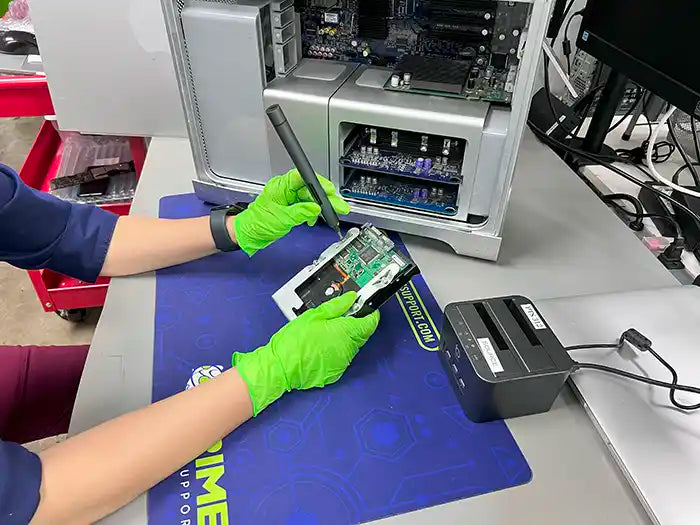
How Our Mac Data Recovery Process Works
Data recovery is never a one-size-fits-all service. Each Mac and storage device behaves differently depending on the failure type and hardware condition.
- Diagnostic-first approach to identify logical vs physical failures
- Recovery planning based on your specific device and data condition
- Software-level or component-level recovery when required
- Case-by-case evaluation to protect data integrity
Because every recovery scenario is unique, timelines and outcomes may vary. Our priority is always safe, professional data extraction.
Nationwide Mail-In Mac Data Recovery Services
If you’re not located in Miami, we offer a secure nationwide mail-in Mac data recovery service for customers across the United States. You can ship your MacBook, iMac, Mac mini, Mac Studio, or Apple storage device directly to our Miami recovery lab for professional evaluation and recovery.
Our technicians have experience working with modern Apple storage technologies, including soldered SSDs integrated into the logic board, T2-secured systems, Apple Silicon devices, Fusion Drives, and external storage. Mail-in cases receive the same lab-based diagnostics, careful handling, and transparent recovery process as in-store services.
This option is ideal for customers whose Mac will not power on, is not recognized, or requires advanced component-level access that cannot be performed remotely.
Why Choose Prime Tech Support for Mac Data Recovery
Prime Tech Support provides advanced Mac data recovery for Intel and Apple Silicon devices, including systems with soldered NVMe SSDs. Unlike software-only recovery services, our lab performs component-level diagnostics to recover data from Macs affected by liquid damage, logic board failures, and storage controller issues. Services are available at our Miami lab or via secure nationwide mail-in.
Complete Solutions for Mac Data Recovery

Walk-In
Bring your Mac directly to our Miami repair lab for in-store data recovery evaluation and service. Ideal for urgent cases or when you want to speak directly with a technician.

Mail-In
Secure nationwide mail-in data recovery for Mac computers. Ship your device to our lab and our technicians will evaluate and attempt recovery using professional tools and procedures.

Pickup
For local customers, we offer pickup options for Mac data recovery when visiting the store isn’t convenient. Availability depends on location and device condition.
Looking for other recovery options beyond Macs or computers?
Explore all data recovery services
Frequently Asked Questions About Mac Data Recovery
Can you recover data from MacBooks with Apple Silicon (M1, M2, M3)?
Is it possible to recover data from a Mac that won’t turn on?
What types of data loss can Mac data recovery fix?
Do you offer mail-in Mac data recovery services?
How long does Mac data recovery usually take?
Customer Reviews for Our Mac Data Recovery Services
 Chris O Miami, FL
Ready to start your recovery? Get a Professional Evaluation

