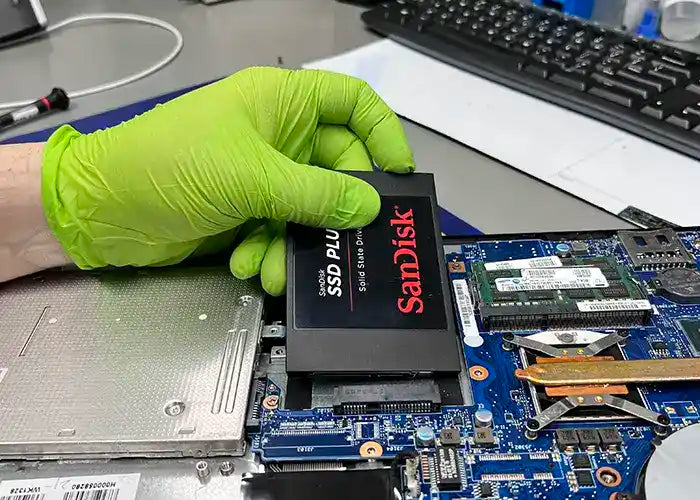
The Laptop Hard Drive Replacement service involves the replacement of the existing hard drive in your laptop with a new one, preferably to a Solid State Drive (SSD). SSDs are up to 10 times faster than traditional hard drives, and they're also more reliable.
The Laptop Hard Drive Replacement includes the assessment of your laptop's current hard drive, consultation with our technicians to determine the appropriate replacement drive, and the installation and configuration of the new hard drive.
Benefits of Hard Drive Replacement for Laptop Computers:
Increased Storage Capacity:
Upgrading the hard drive allows for a larger storage capacity, providing you with more space to store files, applications, and media on your laptop.
Improved Performance:
Installing a new hard drive can significantly enhance the overall performance of your laptop. It leads to faster boot times, quicker data access, and improved responsiveness, allowing you to work more efficiently.
Data Security and Reliability:
When replacing the hard drive, you have the opportunity to transfer your data from the old drive to the new one. This ensures the safety of your important files and protects against potential data loss due to a failing or damaged hard drive.
Compatibility and Future-Proofing:
Upgrading the hard drive ensures compatibility with the latest software and operating systems, enabling you to take advantage of new features and updates. It also future-proofs your laptop by providing adequate storage for future needs.
Energy Efficiency:
Newer hard drives often come with improved power efficiency, resulting in better battery life for your laptop. This allows you to use your laptop for longer periods without needing to charge it frequently.
Common Signs of Hard Drive Damage or Issues with Laptop Computers:
Slow Performance:
If your laptop is running slower than usual, experiencing extended boot times, or applications are taking longer to open, it could indicate a failing hard drive.
Unusual Noises:
Clicking, grinding, or scratching sounds coming from your laptop's hard drive can be a sign of a failing or damaged drive.
Frequent Error Messages:
If you frequently encounter error messages related to disk read/write errors, corrupted files, or bad sectors, it may indicate a problem with the hard drive.
Blue Screen of Death (BSOD):
If your laptop crashes and displays a blue screen with error messages, it could be due to hard drive issues, such as system file corruption or hardware failure.
Inaccessibility of Files:
If you have difficulty accessing certain files or folders, or if they suddenly disappear, it could be a sign of hard drive failure.
If you observe any of these signs, it is advisable to consult with our professional technicians or consider booking a Laptop Hard Drive Replacement service. Replacing a failing hard drive in a timely manner helps prevent data loss and ensures the continued functionality of your laptop.
Our Laptop Hard Drive Replacement Service includes:
The Laptop Hard Drive Replacement Service includes the assessment of your Laptop's current Solid State Drive (SSD) or Hard Drive (HDD), consultation with our technicians to determine the appropriate replacement drive, and the installation and configuration of the new hard drive.
Every time we do a hard drive replacement either because you want to upgrade the space or because of a hardware failure, we do the following steps:
Step #1: Diagnostic & Quote
The service begins with a diagnostic assessment to determine if you really need a hard drive replacement. The technician will examine the Laptop's hardware and software to identify any issues that could have caused the problems you are experiencing with your Laptop. Once the cause has been determined, the technician will provide the diagnostic to either confirm we need a hard drive replacement or if something else needs to be fixed instead. Diagnostics are very important to us because this is how everything starts for us.
We will provide a Quote for the cost of the Laptop Hard Drive Repair Service Replacement or something else. The diagnostic fee will be applied to the final cost of the repair. When you buy this service, we only charge for the diagnostic fee which is used to determine how we will fix your unit and if parts are necessary for the work to be done.
Step #2: Repair or Replacement of the Hard Drive
The hard drive replacement process or the service you really need will begin once you approve the quote and diagnostic. We provide the parts for our repairs, but you can also decide to bring your own parts. If you provide your own parts, we will not be able to provide a warranty for your part or service. If the part is damaged or not working once we install it, there will be additional cost for the extra labor.
Step #3: Quality Assurance & Delivery
Quality Assurance is completed to make sure your unit is working as it should and your Laptop is running like before your incident. You can pick up your unit once the QA has passed. We have Delivery options as well if you need them. Contact our team if you have any questions or need special delivery or shipping.