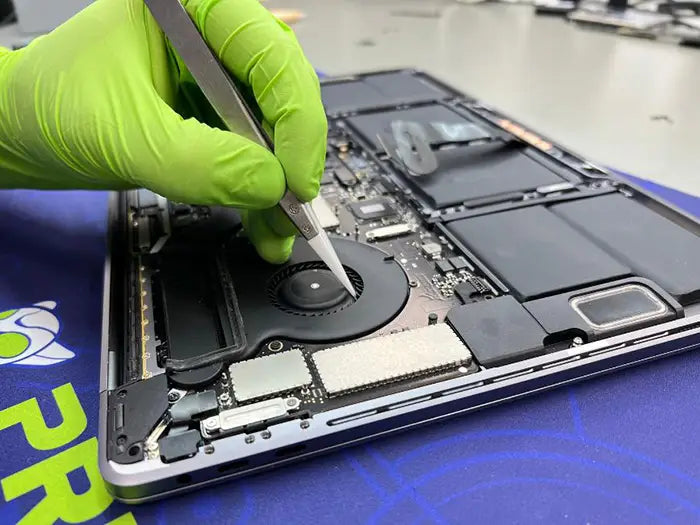
MacBook Fan Not Working Diagnostics and Repair
If your MacBook is hot and you can’t hear the fan, the first question is not “What is broken?” It is “Does this MacBook model even have a fan?”
A lot of confusion around a MacBook fan not working comes down to that one detail. Some MacBooks are designed to run silently because they do not have a fan at all. Others rely on active cooling, so a hot machine with no fan response can be a real warning sign.
This guide explains when fan silence is normal, when it points to a problem, how to check what is actually happening, and what your repair options look like once you confirm there is a real cooling issue.
Table of Contents
A MacBook fan not working means a fan-equipped Mac is hot but the fan is not spinning, reporting RPM, or responding under load. On modern fanless MacBook Air models, silence is normal because there is no fan to activate in the first place.
When silence is normal: Light workloads on most Macs, or normal use on a fanless MacBook Air.
When silence is a warning sign: A MacBook Pro, or an older Intel MacBook Air, is hot to the touch, slowing down, shutting down unexpectedly, or reporting 0 RPM while under sustained load.
The safest first step is to identify your model before assuming the fan has failed.
MacBook Air vs MacBook Pro: Does Your Model Even Have a Fan?
Before troubleshooting anything, confirm what you are working with. Apple’s cooling design is not the same across every MacBook, and assuming every MacBook has a fan can lead to the wrong diagnosis.
Apple Silicon MacBook Air: When No Fan Noise Is Normal
Current Apple Silicon MacBook Air models are fanless by design. Apple describes the newest 13-inch and 15-inch MacBook Air models with M5 as completely silent and fanless.
If you own a modern Apple Silicon MacBook Air and it is warm but quiet, the silence may be completely normal. These models use passive cooling, which spreads heat through the chassis instead of using a moving fan.
Older Intel MacBook Air Models: Do Not Assume Fanless
Not every MacBook Air is fanless. Several older Intel-based MacBook Air models do have a fan.
If you are not sure which model you have, check Apple menu → About This Mac and look for the model year and chip. An Intel MacBook Air with a stuck, disconnected, or failed fan should be treated more like a MacBook Pro cooling issue than a normal fanless-design situation.
MacBook Pro Models: Why Fan Response Matters
MacBook Pro models use active cooling. Under sustained intensive tasks like video export, large compiles, graphics-heavy work, or heavy multitasking, the fans may run faster or become audible, especially in a quiet room or warm environment.
If your MacBook Pro is working hard, running hot, and the fan never engages at all, something in the cooling chain may not be functioning correctly.
Does My MacBook Have a Fan?
| Model Type | Fan Status | Silence Is Normal When... | Investigate When... |
|---|---|---|---|
| Current Apple Silicon MacBook Air | Fanless | The machine is warm but stable, because there is no fan | It overheats, throttles, shuts down, or becomes unusually hot |
| Older Intel MacBook Air | Has a fan | The Mac is idle or under very light use | It gets hot under load with no fan noise or airflow |
| MacBook Pro, Apple Silicon or Intel | Has a fan | The Mac is idle, lightly loaded, or only briefly busy | It stays hot under sustained load with no fan response |
Signs Your MacBook Fan Has Stopped Working
Once you confirm your model should have an active fan, look for the symptoms that usually point to fan failure or fan-control trouble.
No Fan Noise Even When the MacBook Is Very Hot
The chassis feels hot, especially near the hinge or top case, but there is no airflow sound at all.
Rapid Overheating Under Light Workloads
If browsing, email, or word processing makes a fan-equipped MacBook uncomfortably warm, that is not normal thermal behavior.
Thermal Shutdowns With No Fan Response
The system shuts down or slows down dramatically, but you never hear the fan try to compensate.
Fan Spins Briefly, Clicks, or Stops
A fan that starts, makes an odd sound, and then goes quiet again may be mechanically failing or partially obstructed.
Fan Error Codes or Sensor Warnings
Some fan or thermal faults may appear through Apple Diagnostics as a reference code.
| Symptom | Likely Cause | Next Step |
|---|---|---|
| No fan noise while the machine is very hot | Fan motor failure, disconnected cable, or fan-control issue | Check RPM, then get the fan circuit inspected |
| Hot under light workloads | Background CPU load, poor airflow, or cooling fault | Check Activity Monitor before assuming hardware failure |
| Fan spins briefly, clicks, then stops | Mechanical wear, obstruction, or weak connection | Avoid heavy use and schedule a diagnostic |
| Thermal shutdown with no fan response | Fan, sensor, or control-signal failure | Stop using the Mac under load and get it tested |
| Fan reference code in Apple Diagnostics | Hardware-level fault | Save the code and bring the MacBook in for bench testing |
If your MacBook Pro is showing these signs, pause heavy workloads and get the fan, cable, and thermal behavior checked before replacing parts. A MacBook Pro repair diagnostic can confirm whether the issue is the fan itself, a cable, a sensor path, or something deeper on the board.
Common Causes of MacBook Fan Failure
A “dead” fan is not always the fan’s fault. These are the most common causes to consider.
Fan Motor Failure
Like any small motor, a MacBook fan has bearings and internal parts that wear over time. This often starts gradually: the fan gets louder, becomes inconsistent, spins intermittently, and eventually stops responding.
Disconnected Fan Cable After Cleaning or Repair
This is one of the first things to suspect if the fan stopped working right after the MacBook was opened.
MacBook fan cables use small, delicate connectors. During cleaning, battery work, trackpad repair, or other internal service, a cable can be left slightly loose or disturbed. If the timing lines up — the fan worked before the machine was opened, then stopped afterward — the fan cable or connector should be checked before assuming the motor failed.
Dust or Debris Jamming the Fan Blades
Dust buildup can block airflow and, in some cases, physically interfere with the fan blades. This is more likely on a MacBook that has not been cleaned in several years or has been used in dusty environments.
How to Diagnose a MacBook Fan Problem Safely
Use this order before assuming you need a new fan.
Step 1: Confirm Your MacBook Model
Go to Apple menu → About This Mac. Check whether the machine is a MacBook Air or MacBook Pro, and whether it uses Apple Silicon or an Intel processor.
Step 2: Check Workload Before Blaming the Fan
Open Activity Monitor and look at CPU usage. Sometimes the issue is not the fan at all — it is a background process quietly pushing the Mac harder than expected.
Step 3: Use Fan Monitoring Software to Check RPM
Tools like iStat Menus or Macs Fan Control can show a live fan RPM reading. A fan-equipped Mac reading 0 RPM while genuinely hot is a strong warning sign, but treat third-party apps as observation tools, not final hardware proof.
Step 4: Restart or Reset SMC the Right Way
For Apple Silicon Macs, restart the machine or close and reopen the lid. For Intel Macs, an SMC reset may help if the issue is tied to power management.
Step 5: Run Apple Diagnostics
Apple Diagnostics can help identify possible hardware issues, and the startup process is different for Apple Silicon and Intel Macs. Apple’s Apple Diagnostics instructions explain how to start the test and interpret the next steps.
Step 6: Know When It Needs Bench Testing
If the fan still is not responding on a model that should have one, a technician needs to test the fan, cable, connector, sensor path, and logic board fan-control circuit. These are not practical checks to do at home without the right tools.
| What You See | What It Likely Means |
|---|---|
| 0 RPM, machine hot, fan-equipped model | Fan, cable, or control-signal failure |
| Fluctuating or inconsistent RPM | Partial mechanical wear or intermittent connection |
| Fan spins briefly, then reads 0 RPM | Obstruction, weak fan motor, or unstable connector contact |
| Normal RPM but the machine still overheats | Airflow blockage, thermal paste issue, workload, or another thermal problem |
| Apple Diagnostics shows a reference code | Hardware-level fault that should be tested further |
Technician note: When a MacBook comes in for a “fan not working” complaint, the first bench check is not only the fan. We check whether the board is sending the fan a signal, whether the connector is seated, and whether the fan can report RPM correctly. That order matters because it helps avoid replacing a fan that was never the real problem.
What Not to Do If Your MacBook Fan Is Not Working
Do Not Keep Using Heavy Apps While the MacBook Is Hot
Video export, gaming, large file processing, and other heavy tasks add more heat. If a fan-equipped MacBook is already hot and silent, reduce the workload until the issue is checked.
Do Not Blast Compressed Air Aggressively Into the Vents
Compressed air used the wrong way can push debris deeper into the machine or stress delicate fan components. If dust is suspected, controlled cleaning is safer than forcing air blindly through the vents.
Do Not Replace the Fan Before Confirming the Cause
If the real issue is a loose cable, damaged connector, sensor fault, or logic board fan-control problem, a new fan will not fix it.
Apple’s guidance on operating Mac laptops within safe temperature ranges is a useful reference here. Mac laptops rely on internal sensors, and where fans are present, those fans are designed to engage automatically to manage heat. When that response is not happening, the safest move is to reduce load instead of pushing through it.
If you have confirmed symptoms and ruled out the easy explanations, a MacBook Pro repair diagnostic can separate a debris jam, loose cable, dead fan motor, sensor issue, and board-level control fault before anything gets replaced.
MacBook Fan Replacement Cost and Repair Options
MacBook fan replacement cost depends on the model, how many fans it uses, part availability, cable and connector condition, and whether the fan is actually the failed part.
A reliable quote requires inspection first. Two MacBooks can show the same symptom but need completely different repairs.
| Situation | Likely Fix |
|---|---|
| Fan motor is worn out or dead, cable and connector are fine | Fan replacement |
| Dust or debris is blocking the fan, but the hardware is healthy | Cleaning and possible cable reseating |
| Fan worked before cleaning or repair, then stopped | Cable and connector inspection first |
| Fan was replaced but RPM still reads 0 | Logic board fan controller or sensor diagnosis |
| Fan runs normally but the MacBook still overheats | Airflow, thermal paste, workload, or broader thermal diagnosis |
When Fan Replacement Is Enough
Fan replacement is usually enough when diagnostics confirm a worn motor, physically failed fan, or fan assembly problem while the cable, connector, sensor path, and board signal are normal.
When Cleaning or Cable Reseating Solves It
If the fan is mechanically healthy but blocked by debris, or if the connector is loose, the repair may be smaller than a full replacement. This is especially common when the fan stopped working right after the MacBook was opened.
When the Logic Board Needs Diagnosis
If a known-good or newly replaced fan still does not report RPM, the issue may sit with the logic board’s fan-control circuit or a sensor path rather than the fan itself. MacBook Pro logic board repairs explains what that repair path looks like when the issue becomes board-level.
Why Exact Pricing Requires Model and Inspection
Exact pricing depends on the MacBook model, part availability, repair scope, and whether the issue is fan-only or board-level. A diagnosis-first app
MacBook Fan Repair in Miami
If your MacBook Air is warm but quiet and you are not sure whether that is normal for your model, our MacBook Air overheating guide can help you separate workload, airflow, and hardware causes before assuming the fan is broken.
For MacBook Pro owners, or older Intel MacBook Air owners, a hot and silent machine should be tested instead of guessed at. We check fan RPM, cable and connector condition, thermal sensor readings, and logic board fan control before recommending any part replacement.
After a confirmed fan replacement, the repair should also include airflow and thermal testing. The goal is not only to install a new fan — it is to confirm that the MacBook cools correctly afterward.
If your MacBook fan is completely silent while the machine is running hot, do not keep pushing heavy workloads. Our Miami team can diagnose the fan, cable, thermal system, sensor path, and logic board control before recommending fan replacement. Prime Tech Support’s Mac repair services in Miami cover MacBook, iMac, and Mac Pro devices, including Apple Silicon and Intel models.
roach prevents paying for a part that does not solve the problem.MacBook Fan Repair in Miami
If your MacBook Air is warm but quiet and you are not sure whether that is normal for your model, our MacBook Air overheating guide can help you separate workload, airflow, and hardware causes before assuming the fan is broken.
For MacBook Pro owners, or older Intel MacBook Air owners, a hot and silent machine should be tested instead of guessed at. We check fan RPM, cable and connector condition, thermal sensor readings, and logic board fan control before recommending any part replacement.
After a confirmed fan replacement, the repair should also include airflow and thermal testing. The goal is not only to install a new fan — it is to confirm that the MacBook cools correctly afterward.
If your MacBook fan is completely silent while the machine is running hot, do not keep pushing heavy workloads. Our Miami team can diagnose the fan, cable, thermal system, sensor path, and logic board control before recommending fan replacement. Prime Tech Support’s Mac repair services in Miami cover MacBook, iMac, and Mac Pro devices, including Apple Silicon and Intel models.
MacBook Fan Completely Silent While the Device Is Running Hot?
A failed fan can lead to serious overheating and logic board damage. Our Miami team can diagnose the fan, cable, connector, thermal system, sensor path, and logic board fan control before recommending a replacement.
Share this
Related Mac Repair Articles


FAQ MacBook Fan Not Working: Causes, Diagnosis & Repair
Why is my MacBook fan not working?
Is it normal for my MacBook fan to be completely silent?
How can I tell if my MacBook fan has failed?
Can an SMC reset fix a MacBook fan that is not working?
Can I keep using my MacBook if the fan is not working?
Does a MacBook fan that is not spinning always need replacement?
How much does MacBook fan replacement cost?
MacBook Not Working? Get Expert Diagnosis and Repair Options
If your MacBook is experiencing issues, getting a proper diagnosis is the first step. Many problems that seem like major failures can often be resolved with targeted component-level repairs.
At Prime Tech Support, we specialize in advanced MacBook diagnostics and repairs, including issues that other shops may not be able to resolve.
In Miami? Get Local Mac Repair Service
Our team is ready to help you . We offer same-day repairs
Not in Miami? Use Our Mac Mail-In Repair Service
We offer secure nationwide mail-in repairs with fast turnaround times and professional diagnostics.
Explore More MacBook Repair Guides
View all-

MacBook storage problems can involve much more than a failed SSD. Learn how removable and soldered MacBook storage works, common...
MacBook SSD Repair and Upgrade: Complete Guide to Storage Prob...
MacBook storage problems can involve much more than a failed SSD. Learn how removable and soldered MacBook storage works, common...
-

Is your MacBook running hot but the fan is completely silent? Learn how to determine whether your MacBook has a...
MacBook Fan Not Working Diagnostics and Repair
Is your MacBook running hot but the fan is completely silent? Learn how to determine whether your MacBook has a...
-

If your MacBook charges through USB-C but does not recognize external drives, hubs, docks, or accessories, the problem may be...
MacBook USB-C Data Transfer Not Working: Causes and Fixes
If your MacBook charges through USB-C but does not recognize external drives, hubs, docks, or accessories, the problem may be...