

Why Your MacBook Pro Trackpad Isn’t Clicking (And What Causes It)
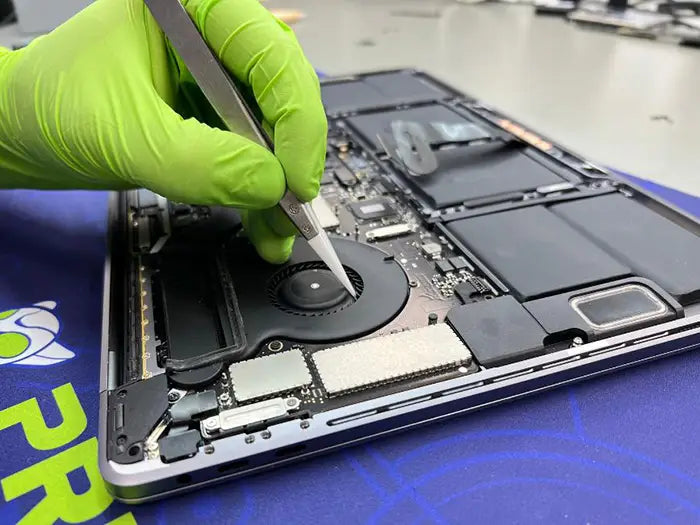
A non-working MacBook Pro trackpad does not automatically mean the trackpad is defective. That distinction matters — because replacing the wrong part wastes money and does not solve the real issue. Recently, a MacBook Pro came into our Miami repair lab with a completely unresponsive trackpad. The customer had already been told it required a full trackpad repxlacement. After a comprehensive diagnostic, we discovered something different. The trackpad itself was fully functional. The real failure was a damaged flex cable connector. Instead of replacing the entire assembly, we performed a targeted component-level repair — restoring full functionality while preserving the original Apple hardware.
MacBook Pro Trackpad Not Working?
Same-day diagnostics available in Miami. Certified Mac technicians since 2010.
Book Your Trackpad RepairTable of Contents
- Common MacBook Pro Trackpad Failures
- Symptoms That Can Be Misleading
- Our Advanced MacBook Diagnostic Process
- Identifying the Damaged Flex Cable Connector
- Confirming the Logic Board Was Safe
- Targeted Component-Level Repair
- Why Replacement Is Not Always the Right Answer
- MacBook Pro Trackpad Repair in Miami
Common MacBook Pro Trackpad Failures
If your MacBook Pro trackpad is not working, the symptoms may include:
- No cursor movement
- Clicking not responding
- Force Touch not activating
- Trackpad not detected in System Settings
- Delayed or erratic input
- Random freezing
Many repair shops immediately recommend replacing the entire trackpad assembly. While that can be necessary in some cases, it is not always the correct diagnosis. Modern MacBook Pros rely on precision flex cables to connect the trackpad to the logic board. These connectors are delicate and can fail due to:
- Liquid exposure
- Battery swelling pressure
- Improper prior repair attempts
- Physical impact
- Connector fatigue over time
Without proper diagnostic testing, it is easy to misidentify the root cause.
Symptoms That Can Be Misleading
A completely unresponsive trackpad often leads customers to fear:
- Trackpad hardware failure
- Logic board damage
- Expensive motherboard replacement
In this case, the MacBook Pro showed:
- No click
- No movement
- No Force Touch feedback
The customer was understandably concerned about a costly repair. Before recommending any part replacement, we followed our structured diagnostic protocol.
Our Advanced MacBook Diagnostic Process
At Prime Tech Support, we do not guess. We test. Our MacBook diagnostic process in Miami includes:
- External mouse and keyboard verification
- macOS system-level hardware recognition testing
- SMC and NVRAM reset procedures
- Battery inspection for internal swelling
- Internal inspection under magnification
- Connector integrity examination
- Corrosion and oxidation inspection
Once the device was opened, we carefully inspected:
- Trackpad cable routing
- Flex connector stability
- Logic board socket integrity
- Pad alignment under microscope
That is when we identified the real issue.
The Real Problem: A Damaged Flex Cable Connector
The trackpad itself showed no internal failure. However, the flex cable connector displayed:
- Misaligned connector pins
- Compromised latch integrity
- Inconsistent contact pressure
The main problem was the flex, and this prevented proper signal transmission between the trackpad and the logic board. In simple terms: The trackpad was working, but the signal pathway was broken. Replacing the trackpad assembly would have resolved the issue, but it would have cost more than just replacing the flex.
Confirming the Logic Board Was Safe
Before performing any connector-level repair, we verified that the logic board had not sustained damage. We performed:
- Continuity testing
- Power rail verification
- Microscope inspection of solder pads
- Signal integrity validation
The board pads were intact. There was no short circuit and no corrosion. This confirmed a targeted repair was possible.
The Targeted Component-Level Repair
Instead of replacing the full trackpad assembly, we performed a precision connector repair. The repair involved:
- Careful removal of the damaged connector section
- Cleaning and preparing contact surfaces
- Realigning the flex connection under magnification
- Re-securing the latch mechanism
- Testing signal continuity before reassembly
After reassembly, the trackpad functioned normally across:
- Cursor tracking
- Force Touch sensitivity
- Multi-touch gestures
- System detection and configuration
No full trackpad replacement was required.
Why Replacement Is Not Always the Right Answer
Modern repair environments often rely on part swapping. While efficient, it is not always accurate. Proper diagnostics prevent:
- Unnecessary part replacement
- Inflated repair costs
- Loss of original Apple components
- Extended downtime
Component-level repair preserves:
- Factory calibration
- Original Apple hardware
- Lower repair budgets
- Environmental sustainability
In this case, accurate diagnosis saved the customer both money and time.
MacBook Pro Trackpad Repair in Miami
If your MacBook Pro trackpad has stopped working, the issue may not be what you think. At Prime Tech Support, we specialize in:
- MacBook Pro trackpad repair
- Flex cable connector repair
- Component-level Apple repairs
- Logic board diagnostics
- Advanced MacBook troubleshooting
We do not default to the most expensive solution. We default to the most accurate one.
📍 Serving Miami and surrounding areas
📞 Call 786-600-6999
Book a professional MacBook diagnostic today. Proper diagnostics make the difference between replacing parts and truly repairing devices.
Share this
Explore more


FAQ MacBook Pro trackpad not working
Why is my MacBook Pro trackpad not working?
Does a non-responsive trackpad mean it needs replacement?
Can a damaged flex cable be repaired instead of replacing the trackpad?
Do you offer MacBook Pro trackpad repair in Miami?
How long does MacBook trackpad repair take?
Same-day repairs
Mac Repairs
Fast tech support for Mac Computers. We exceed customer expectations and ensure satisfaction.

Mac Blog by Computer Experts in Miami
View all-

A non-working MacBook Pro trackpad doesn’t always mean the trackpad is defective. In this Miami repair case, Prime Tech Support...
Why Your MacBook Pro Trackpad Isn’t Clicking (And What Causes It)
A non-working MacBook Pro trackpad doesn’t always mean the trackpad is defective. In this Miami repair case, Prime Tech Support...
-
How to replace MacBook Air keys yourself or get professional help from Prime Tech Support in Miami. Tips and guidance...
MacBook Air Keys Replacement: DIY Guide and Professional Help ...
How to replace MacBook Air keys yourself or get professional help from Prime Tech Support in Miami. Tips and guidance...
-
Learn how regular cleaning and maintenance can prolong the life of your MacBook Pro. Discover how Prime Tech Support in...
Why Regular Cleaning is Crucial for Your MacBook Pro's Longevity
Learn how regular cleaning and maintenance can prolong the life of your MacBook Pro. Discover how Prime Tech Support in...


