MacBook Liquid Damage Repair Cost: What to Expect in 2026
If you just spilled water, coffee, soda, juice, or another drink on your MacBook, you probably want a real number — not a lecture. So here is the straightforward answer first:
MacBook liquid damage repair usually costs about $150–$300 for light cleaning or minor corrosion, $250–$650 for keyboard, trackpad, battery, or top case issues, $300–$850 for component-level logic board repair, and $600–$1,200+ for severe logic board damage or full logic board replacement.
Those are planning ranges, not guaranteed quotes. Liquid damage has to be inspected before anyone can price it accurately because the same spill can cause a sticky keyboard, charging failure, logic board corrosion, data loss, or several problems at once.
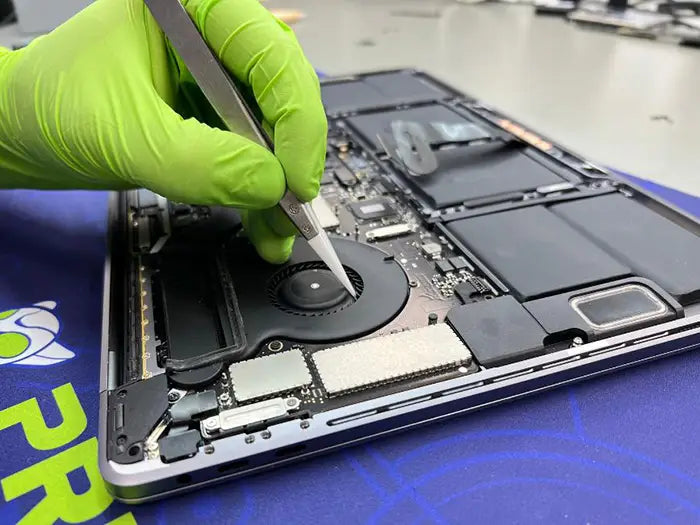
At Prime Tech Support, MacBook liquid damage repair usually starts with a diagnostic. That diagnostic determines whether your MacBook needs cleaning, component-level board repair, part replacement, data recovery, or replacement instead of repair.
Quick Summary
| Question | Straight Answer |
|---|---|
| How much does MacBook liquid damage repair cost? | Usually $150–$1,200+, depending on damage severity |
| Can a shop quote it without opening the MacBook? | No. Liquid damage needs internal inspection |
| Is Apple cheaper than third-party repair? | Sometimes, especially with AppleCare+; not always without coverage |
| Is repair worth it? | Often, if the damage is localized and the quote is well below replacement cost |
| What should you do first? | Power it off, unplug it, stop testing it, and get it inspected |
Table of Contents
Quick 2026 MacBook Liquid Damage Repair Cost Table
| Damage Level | Estimated Cost Range | What Is Usually Involved |
|---|---|---|
| Diagnostic / evaluation | Around $90 | Internal inspection, corrosion mapping, testing, written quote |
| Light cleaning / minor corrosion | $150–$300 | Cleaning residue, drying, minor corrosion removal, function testing |
| Keyboard, trackpad, or top case issue | $250–$650 | Component replacement, cleaning, and retesting |
| Battery or charging issue | $200–$500 | Battery, USB-C/DC-in, or charging circuit diagnosis and repair |
| Component-level logic board repair | $300–$850 | Board-level cleaning, microsoldering, short detection, power rail repair |
| Full logic board replacement | $600–$1,200+ | Replacement board, depending on model and configuration |
| Data recovery add-on | $250–$1,500+ | Depends on storage design, encryption, corrosion, and board condition |
These ranges are meant to help you plan. Your final quote depends on your MacBook model, the type of liquid, whether the laptop was powered on after the spill, how long the liquid sat inside, and which parts were affected.
If you already know your model, start with the right service path: MacBook Pro liquid damage repair or MacBook Air liquid damage repair.
Why No Shop Can Quote MacBook Liquid Damage Accurately Without Inspection
Liquid damage is not like a cracked screen quote. A cracked screen is usually one part and one labor path. Liquid damage is different because the spill can move through the machine and affect several areas at once.
A liquid-damaged MacBook may need only cleaning, or it may have damage to:
- Keyboard or trackpad connectors
- Battery or charging circuit
- USB-C or DC-in area
- Display connectors
- Logic board power rails
- Storage-related circuits
- Touch ID, speakers, or other internal components
Sugary or acidic liquids such as soda, juice, coffee with cream, beer, or milk are usually worse than plain water because they leave residue behind. That residue can continue attracting moisture and corroding contacts after the MacBook feels dry.
That is why a real quote requires opening the MacBook, inspecting the board under magnification, mapping corrosion, and testing affected circuits. Without that step, any price is only a guess.
What Changes the Price of MacBook Liquid Damage Repair?
Several factors determine whether the repair lands near $200 or closer to $900+.
1. The Type of Liquid
Plain water is usually the best-case scenario, especially if the MacBook was powered off quickly. Coffee, soda, juice, beer, and milk are more problematic because they can leave sticky, acidic, or conductive residue behind.
Cost impact: Sugary or acidic liquids usually raise the cost because they require more cleaning, more testing, and sometimes component-level repair.
2. Whether the MacBook Was On or Charging
If the MacBook was powered on or plugged in when the spill happened, the risk of a short circuit is higher. A short can damage components immediately instead of slowly.
Cost impact: A MacBook that was powered on after the spill is more likely to need charging circuit repair, power rail repair, or logic board work.
3. How Long the Liquid Sat Inside
A spill from five minutes ago is very different from a spill that sat inside the MacBook for two weeks. Corrosion can spread over time, especially if residue remains on connectors, cables, or board areas.
Cost impact: Faster inspection can sometimes keep a cleaning job from becoming a board-level repair.
4. Which Parts Were Affected
Keyboard and trackpad issues are usually less expensive than logic board issues. Battery and charging problems sit in the middle. Logic board damage is more expensive because it may require board-level diagnosis, cleaning, soldering, or replacement.
Cost impact: The more systems affected, the more expensive the repair becomes.
5. MacBook Model, Year, and Parts Availability
Newer Apple Silicon MacBooks are highly integrated, which can make some repairs more complex. Older Intel MacBooks may have a lower replacement value, and some parts may be harder to source.
Cost impact: The same spill may not cost the same on a newer MacBook Pro, an older Intel MacBook Air, and a recent Apple Silicon MacBook.
MacBook Air vs. MacBook Pro Liquid Damage Cost
The model matters, but the affected parts matter more. A small spill on a MacBook Pro may cost less than a severe spill on a MacBook Air if the Pro only needs cleaning and the Air needs board-level repair.
| Model Type | Typical Cost Pattern | Why |
|---|---|---|
| MacBook Air | Often lower to moderate | Fewer high-end configurations, but logic board and top case damage can still be costly |
| MacBook Pro | Often moderate to high | More expensive configurations, higher board replacement costs, and more complex models |
| Older Intel MacBook | Repair decision depends heavily on value | Repair may not make sense if the quote approaches replacement value |
| Apple Silicon MacBook | Often worth inspecting first | Newer models may justify repair if damage is localized and replacement cost is high |
For many customers, the best first question is not “Can it be repaired?” but “Is the repair worth it compared with replacing the MacBook?” A diagnostic helps answer that before you approve work.
Apple Store vs. Third-Party MacBook Liquid Damage Repair Cost
Apple and third-party repair shops handle liquid damage differently, so the right option depends on your coverage, budget, and repair goal.
What Apple Says About Liquid Damage
Apple states that liquid damage to Mac computers and accessories is not covered by the Apple One-Year Limited Warranty or the AppleCare Protection Plan. AppleCare+ is different because it can include accidental damage protection, but service fees and taxes may apply. Apple’s liquid damage warranty page explains the warranty limitation.
Apple also says it needs to inspect your Mac to determine the final service fee, and Apple Authorized Service Providers may set their own service fees. You can review Apple’s repair-estimate language on its Mac laptop repair page.
When Apple May Make More Sense
Apple may be the better option if:
- You have active AppleCare+ coverage
- You want Apple’s official service process
- The repair is covered under your AppleCare+ accidental damage terms
- You prefer full part replacement over component-level repair
When a Third-Party Component-Level Repair Shop May Make More Sense
A third-party repair shop may make more sense when the issue is localized and the MacBook does not necessarily need a full board replacement.
For example, if the problem is a corroded charging area, shorted component, damaged connector, or specific power rail issue, component-level repair may cost less than replacing the entire logic board. It is not always possible, but it can be the difference between a repair that makes financial sense and one that does not.
For a deeper breakdown, see our guide to MacBook logic board repair vs. replacement.
Is MacBook Liquid Damage Worth Repairing?
MacBook liquid damage is usually worth inspecting before deciding. Whether it is worth repairing depends on the repair quote, replacement cost, age of the MacBook, and importance of the data.
Repair Is Usually Worth Considering When
Repair may make sense if:
- The MacBook is a newer Apple Silicon model
- The damage is localized
- The logic board can be repaired instead of replaced
- The MacBook’s replacement cost is much higher than the repair quote
- The files matter and data recovery is part of the goal
- The laptop is used for work, school, or business continuity
Replacement May Be Smarter When
Replacement may be smarter if:
- Corrosion has spread across several systems
- The keyboard, battery, display, and logic board are all affected
- The MacBook is an older Intel model with limited resale value
- The repair quote approaches the cost of a comparable replacement
- Data is already backed up and the machine is not worth saving
Simple Repair vs. Replace Rule
| Repair Quote Compared With Replacement Value | General Guidance |
|---|---|
| Under 25% | Usually worth repairing |
| 25%–50% | Depends on model age, data needs, and condition |
| Over 50%–60% | Replacement is often smarter unless data recovery or downtime matters |
This is only a starting framework. The diagnostic is what turns the guess into a real decision.
Common MacBook Liquid Damage Scenarios and Cost Impact
MacBook Still Turns On, But the Keyboard or Trackpad Acts Wrong
This often points to keyboard, trackpad, top case, cable, or connector damage. It may be less expensive than a full no-power issue, but it still needs inspection because liquid can also be sitting on the board.
Likely cost range: $250–$650, depending on the part and model.
MacBook Will Not Turn On at All
A no-power MacBook can mean battery damage, charging circuit failure, a shorted component, or logic board damage. This is one of the scenarios where guessing is least helpful.
Likely cost range: $300–$1,200+, depending on whether the board can be repaired or must be replaced.
MacBook Charges Intermittently or Does Not Recognize the Charger
This may involve the USB-C/DC-in area, charging circuit, battery, or logic board power path.
Likely cost range: $200–$850, depending on whether the issue is part-level or board-level.
MacBook Works Now, But the Spill Happened Recently
This is the tricky one. A working MacBook can still have residue or corrosion developing inside. Waiting can make the repair more expensive if corrosion spreads.
Likely cost range: $150–$300 if caught early and limited to cleaning, more if damage is already active.
The Files Matter More Than the MacBook
If the data matters, stop trying to power the MacBook on repeatedly. Every failed test can increase the risk of further damage. Our guide to MacBook liquid damage data recovery explains why timing and storage design matter after a spill.
What PrimeTech Checks During a MacBook Liquid Damage Diagnostic
A liquid damage diagnostic is not a quick glance. It is the step that determines whether the MacBook needs cleaning, part replacement, board-level repair, data recovery, or replacement.
Prime Tech Support has provided Mac repair since 2010 and has completed more than 5,000 Mac repairs, including liquid damage restoration, advanced diagnostics, Apple Silicon repair, and component-level logic board repair.
During a MacBook liquid damage diagnostic, we check:
Internal Inspection and Corrosion Mapping
We open the MacBook and inspect the internal areas where liquid commonly travels, including the keyboard area, trackpad, battery area, logic board, connectors, and shielded sections.
Power and Charging Circuit Testing
We test the power path, charging behavior, battery condition, and affected power rails to see whether the MacBook is receiving and distributing power correctly.
Keyboard, Trackpad, Display, and Battery Evaluation
Each major component is tested so we do not recommend replacing parts that are not actually causing the issue.
Board-Level Diagnosis When Needed
If corrosion or shorts are found on the logic board, we determine whether component-level repair is possible or whether replacement is the more reliable option.
Written Quote Before Repair
You get a clear explanation of what we found and what it will cost before repair work begins. No repair is performed without approval.
If your MacBook needs inspection, start with the correct model diagnostic: MacBook Pro diagnostic or MacBook Air diagnostic.
Why PrimeTech’s Diagnostic Matters
Liquid damage repair is not just about whether the MacBook turns on today. It is about finding what the liquid touched, whether corrosion has started, whether the board can be cleaned or repaired, and whether the repair makes financial sense.
PrimeTech’s diagnostic is designed to answer four practical questions:
| Diagnostic Question | Why It Matters |
|---|---|
| What parts did the liquid reach? | Determines whether the issue is minor, moderate, or severe |
| Is corrosion active or spreading? | Helps decide whether cleaning is enough |
| Can the logic board be repaired? | May avoid the cost of full board replacement |
| Is the MacBook worth repairing? | Helps you avoid putting money into a poor repair decision |
That is why the diagnostic comes before the final quote. It protects you from guessing, and it protects the repair process from replacing parts that do not need to be replaced.
MacBook Liquid Damage Repair Cost in Miami
Why Miami MacBook Owners Should Not Wait Too Long
Miami humidity does not cause liquid damage by itself, but moisture and residue are not a good combination inside a MacBook. If liquid is already inside the machine, waiting can give corrosion more time to spread across connectors, cables, and board areas.
If the spill happened recently, the safest move is to power the MacBook off and get it inspected before the damage becomes harder to clean or diagnose.
In-Store and Nationwide Mail-In Options
If you are in Miami, you can bring your MacBook in for an in-person diagnostic. If you are outside South Florida, PrimeTech also supports secure nationwide mail-in repair through its Mac repair services in Miami.
Bottom Line: How to Think About MacBook Liquid Damage Repair Cost
MacBook liquid damage repair is worth inspecting when the MacBook is newer, the damage may be localized, or the data matters. It may not be worth repairing when corrosion affects several systems or the repair quote approaches the cost of replacing the laptop.
The main thing to remember is simple: liquid damage pricing is not final until the MacBook is opened and inspected. A proper diagnostic tells you whether you are looking at cleaning, part replacement, component-level repair, board replacement, data recovery, or replacement instead of repair.
Get a Straight MacBook Liquid Damage Repair Quote
Liquid damage is one of those repairs where guessing can cost more than knowing. A proper diagnostic tells you whether the MacBook needs cleaning, part replacement, component-level board repair, data recovery, or replacement.
Prime Tech Support gives you a clear explanation before any repair begins. We inspect the damage, explain what we found in plain language, and provide a written quote before moving forward.
If you are not sure whether your MacBook is worth repairing, book a MacBook liquid damage diagnostic with Prime Tech Support. We will inspect the damage, explain your options, and give you a written quote before any repair work begins.
Share this

Related Mac Repair Articles


FAQ MacBook Liquid Damage Repair Cost: 2026 Guide
How much does MacBook liquid damage repair cost in 2026?
Is it worth repairing a liquid-damaged MacBook?
Does Apple cover MacBook liquid damage?
Is Apple or a third-party repair shop better for MacBook liquid damage repair?
What should I do immediately after spilling liquid on my MacBook?
Can a MacBook work after a spill and fail later?
Can data be recovered from a liquid-damaged MacBook?
MacBook Not Working? Get Expert Diagnosis and Repair Options
If your MacBook is experiencing issues, getting a proper diagnosis is the first step. Many problems that seem like major failures can often be resolved with targeted component-level repairs.
At Prime Tech Support, we specialize in advanced MacBook diagnostics and repairs, including issues that other shops may not be able to resolve.
In Miami? Get Local Mac Repair Service
Our team is ready to help you . We offer same-day repairs
Not in Miami? Use Our Mac Mail-In Repair Service
We offer secure nationwide mail-in repairs with fast turnaround times and professional diagnostics.
Explore More MacBook Repair Guides
View all-

How much does MacBook liquid damage repair cost in 2026? Compare typical costs for cleaning, corrosion, keyboard and trackpad issues,...
MacBook Liquid Damage Repair Cost: What to Expect in 2026
How much does MacBook liquid damage repair cost in 2026? Compare typical costs for cleaning, corrosion, keyboard and trackpad issues,...
-

A MacBook running hot isn't always overheating. Learn normal MacBook temperature ranges, how MacBook Air and Pro models handle heat...
MacBook Running Hot: What Is Normal Temperature vs Overheating?
A MacBook running hot isn't always overheating. Learn normal MacBook temperature ranges, how MacBook Air and Pro models handle heat...
-

A faulty USB-C port can cause charging failures, loose connections, external display issues, and data transfer problems. This guide explains...
MacBook USB-C and Charging Port Repair: Causes, Diagnosis, and...
A faulty USB-C port can cause charging failures, loose connections, external display issues, and data transfer problems. This guide explains...